CHOOSE A VERSION
2 versions · same consoleChoose an original release, regional version, revision, bootleg or clearly labelled ROM hack/mod, then press Play. Hacks may change the gameplay. Switching versions restarts the player.
Selected: Default · USA · En,Fr · USA
The game loads when you press Play · press “Play Now” inside the game if it asks.
Space Chimps (USA) (En,Fr)
Space Chimps
About Space Chimps
- Nintendo DS
- Platformer
- 5· 0 votes
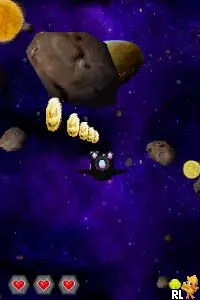
Space Chimps (USA) (En,Fr) is a platform game for the Nintendo DS, released in 2008. Developed by Brash Entertainment, this title is inspired by the animated film of the same name. It offers a lighthearted gaming experience typical of the era, with colorful graphics and a whimsical tone that appeals to a younger audience.
In the game, players take control of different chimps as they navigate through various levels filled with obstacles and enemies. The gameplay revolves around platforming mechanics, where players jump, run, and attack to clear stages. Collectibles and power-ups are scattered throughout the levels, adding layers to the gameplay and encouraging exploration. The controls are straightforward, making it accessible for players of all ages.
While Space Chimps might not be the most groundbreaking title on the DS, it provides a nostalgic trip for fans of platformers. It fits well within the library of family-friendly titles on the system and can be a fun diversion for casual gaming sessions. Similar to other platform games of its time, it offers a blend of action and light puzzle-solving, although it may not have the depth or complexity found in more renowned titles.
GAME INFO
- Platform
- Nintendo DS
- Genre
- Platformer
- Publisher
- Brash Entertainment
- Developer
- Redtribe
- Released
- 2008
- Players
- 1
- Region
- USA
How to play Space Chimps online
Getting started in Space Chimps is straightforward. Upon launching the game, players are greeted with a selection menu where they can choose their character and level. The core gameplay loop involves progressing through levels by overcoming obstacles and defeating enemies, while collecting items that boost performance and score.
As players advance, they will encounter increasingly challenging scenarios that require quick reflexes and strategic thinking. Familiarizing oneself with the controls and level layouts is crucial for success. Exploring each level thoroughly can yield hidden items and shortcuts, enhancing the overall experience.
CONTROLS
Controls
- Arrow Keys — D-Pad / Movement
- X — A button
- S — B button
- Z — Y button
- A — X button
- Q — L shoulder
- E — R shoulder
- Enter — Start
- V — Select
Space Chimps FAQ
Who developed Space Chimps?
Brash Entertainment is credited with the development of Space Chimps for the Nintendo DS.
Does Space Chimps have a multiplayer or co-op mode?
The game does not include a multiplayer or co-op mode, focusing instead on single-player gameplay.
What makes Space Chimps stand out among Nintendo DS titles of its era?
Its connection to the animated film provides a unique theme, and while it may not offer deep gameplay, it serves as a charming, family-friendly platforming experience.
You may also like
All Nintendo DS games











GAME INFO
- Platform
- Nintendo DS
- Genre
- Platformer
- Publisher
- Brash Entertainment
- Developer
- Redtribe
- Released
- 2008
- Players
- 1
- Region
- USA
COMMENTS (0)
No comments yet. Be the first to share your thoughts.