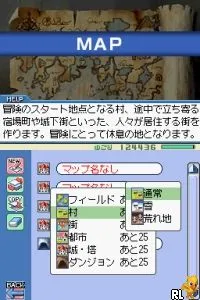
The game loads when you press Play · press “Play Now” inside the game if it asks.
RPG Tkool DS (Japan) (NDSi Enhanced)
RPG Tkool DS
RPG Tkool DS on NDS
- Nintendo DS
- RPG
- 5· 0 votes
RPG Tkool DS (Japan) (NDSi Enhanced) is a role-playing game developed for the Nintendo DS platform. Released exclusively in Japan, this game is a part of the RPG Maker series, allowing players to create their own RPGs. The title is notable for its focus on user-generated content, fitting well within the genre conventions of its time.
In RPG Tkool DS, players can design their own characters, create intricate storylines, and build expansive worlds. The gameplay revolves around utilizing various tools to craft quests, manage events, and implement battle systems. While the game does not provide a traditional narrative, it empowers players to explore their creativity and share their creations with others, a hallmark of the RPG Maker series.
This title is worth exploring today for those interested in game design and storytelling. It serves as a nostalgic reminder of the DIY spirit that characterized many early RPGs. Though it may not attract players seeking a polished, linear experience, RPG Tkool DS offers a unique opportunity for creativity and self-expression, making it a niche but valuable addition to the Nintendo DS library.
GAME INFO
- Platform
- Nintendo DS
- Genre
- RPG
- Players
- 1
- Region
- Japan
How to play RPG Tkool DS online
Getting started in RPG Tkool DS involves familiarizing yourself with the game's interface, which is primarily in Japanese. Players will first choose a template for their game, allowing them to set the tone and style of their RPG. The core loop consists of designing maps, creating characters, and scripting events, which can take some time to master, but it is rewarding to see your ideas come to life.
New players should focus on experimenting with the tools provided to understand their capabilities. It may be helpful to start with simpler projects before tackling more complex narratives. Engaging with online communities can also provide valuable tips and inspiration from other creators who have navigated the same challenges.
CONTROLS
Controls
- Arrow Keys — D-Pad / Movement
- X — A button
- S — B button
- Z — Y button
- A — X button
- Q — L shoulder
- E — R shoulder
- Enter — Start
- V — Select
RPG Tkool DS FAQ
Does RPG Tkool DS have a multiplayer or co-op mode?
The game does not include any multiplayer or co-op features, focusing solely on single-player experiences through user-generated content.
Is RPG Tkool DS exclusive to Nintendo DS or did it appear on other systems?
This title was developed exclusively for the Nintendo DS and did not release on other gaming systems.
In what year was RPG Tkool DS originally released?
The original release year is not widely documented, so specific details regarding its launch year remain unclear.
You may also like
All Nintendo DS games











GAME INFO
- Platform
- Nintendo DS
- Genre
- RPG
- Players
- 1
- Region
- Japan
COMMENTS (0)
No comments yet. Be the first to share your thoughts.