CHOOSE A VERSION
3 versions · same consoleChoose an original release, regional version, revision, bootleg or clearly labelled ROM hack/mod, then press Play. Hacks may change the gameplay. Switching versions restarts the player.
- Default · USA · En,Fr,Es
- Machi no Pet-ya-san DS - 200 Piki Wan-chan Daishuugou (Japan)
- My Puppy Shop (Europe) (En,Fr,De,Es,It,Nl,Sv,Da)
Selected: Default · USA · En,Fr,Es · USA
The game loads when you press Play · press “Play Now” inside the game if it asks.
Puppy Palace (USA) (En,Fr,Es)
Puppy Palace
Puppy Palace - Simulation Classic
- Nintendo DS
- Simulation
- 5· 0 votes
Puppy Palace (USA) (En,Fr,Es) is a Nintendo DS title that falls within the simulation genre. It was released as part of the growing library of games designed for the DS, which was known for its dual-screen capabilities and touch interface. While specific details about the developer are not widely documented, this game is notable for being accessible in multiple languages, catering to a broader audience during its time.
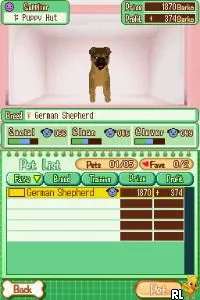
In Puppy Palace, players take on the role of a caretaker for a variety of virtual puppies. The gameplay revolves around managing the puppies' needs, which includes feeding, grooming, and playing with them. Players are encouraged to engage with the puppies through mini-games and tasks that simulate real-life pet care, making it a light-hearted and enjoyable experience for fans of simulation games.
This title is worth trying for those who appreciate casual games that focus on pet management. While it may not have the depth of more complex simulation titles, it captures the charm of caring for virtual pets, which was a popular trend during the DS era. If you're looking for a simple, fun game to play during short breaks, Puppy Palace fits the bill, especially for younger players or those new to the genre.
GAME INFO
- Platform
- Nintendo DS
- Genre
- Simulation
- Players
- 1
- Region
- USA
How to play Puppy Palace online
Getting Started: To begin playing Puppy Palace, start by selecting your puppy from the available options. Each puppy has different needs and characteristics, so choose one that appeals to you. The core loop involves interacting with your puppy to keep it happy and healthy by engaging in various activities like feeding, grooming, and playing.
As you progress, you'll unlock new mini-games and tasks that help you take care of your puppy. Pay attention to the puppy's happiness meter, which indicates how well you are meeting its needs. It's important to balance all aspects of care to ensure your puppy thrives in this virtual environment.
CONTROLS
Controls
- Arrow Keys — D-Pad / Movement
- X — A button
- S — B button
- Z — Y button
- A — X button
- Q — L shoulder
- E — R shoulder
- Enter — Start
- V — Select
Puppy Palace FAQ
Who developed Puppy Palace?
Information about the specific developer of Puppy Palace is not widely documented.
Does Puppy Palace have a multiplayer or co-op mode?
Puppy Palace does not include any multiplayer or co-op modes; it is designed for single-player gameplay.
Is Puppy Palace exclusive to Nintendo DS or did it appear on other systems?
Puppy Palace is primarily known as a Nintendo DS title and does not appear to have been released on other systems.
You may also like
All Nintendo DS games











GAME INFO
- Platform
- Nintendo DS
- Genre
- Simulation
- Players
- 1
- Region
- USA
COMMENTS (0)
No comments yet. Be the first to share your thoughts.