The game loads when you press Play · press “Play Now” inside the game if it asks.
Plop en de Pinguin (Netherlands)
Plop en de Pinguin
What is Plop en de Pinguin?
- Nintendo DS
- Platformer
- 5· 0 votes
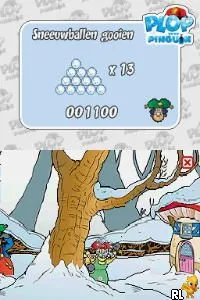
Plop en de Pinguin is a platformer game released for the Nintendo DS, primarily aimed at younger audiences. It is based on the popular Dutch children's character Plop, a friendly gnome, and features engaging gameplay suitable for kids. The game was developed and published in the Netherlands, contributing to the localized gaming experience for Dutch players during the DS era.
In this game, players guide Plop through various levels, where he must navigate obstacles, collect items, and interact with colorful characters. The mechanics are straightforward, focusing on platforming elements such as jumping and running, which are typical for the genre. Players will find themselves solving puzzles and overcoming challenges that require timing and precision while exploring a vibrant world.
What makes Plop en de Pinguin interesting today is its charm and accessibility for younger gamers. While it may not have the depth or complexity of some other DS titles, it offers a nostalgic trip for those familiar with the character and a simple yet engaging experience for new players. Given the genre conventions of platformers from that era, it holds a special place in the library of niche titles that cater specifically to its audience.
GAME INFO
- Platform
- Nintendo DS
- Genre
- Platformer
- Players
- 1
- Region
- Europe
How to play Plop en de Pinguin online
Getting started in Plop en de Pinguin is quite simple. Once you begin, you'll be introduced to the main controls and gameplay mechanics, which revolve around guiding Plop through various levels filled with challenges. The core loop involves jumping, running, and collecting items while navigating through colorful environments.
As you progress, focus on mastering the timing of your jumps and interactions with objects and characters. Pay attention to the layout of each level, as they may contain secrets or shortcuts that can enhance your gameplay experience. Familiarizing yourself with the controls will help you tackle the various obstacles and puzzles that await in Plop's whimsical world.
CONTROLS
Controls
- Arrow Keys — D-Pad / Movement
- X — A button
- S — B button
- Z — Y button
- A — X button
- Q — L shoulder
- E — R shoulder
- Enter — Start
- V — Select
Plop en de Pinguin FAQ
Who developed Plop en de Pinguin?
The information about the developer of Plop en de Pinguin is not widely documented.
Does Plop en de Pinguin have a multiplayer or co-op mode?
This game is designed for a single player experience, and it does not feature any multiplayer or co-op modes.
What makes Plop en de Pinguin stand out among Nintendo DS titles of its era?
Its charm lies in its appeal to younger audiences, with simple gameplay and familiar characters. While it may not compete with more complex titles, it provides a fun and engaging experience for its intended demographic.
You may also like
All Nintendo DS games











GAME INFO
- Platform
- Nintendo DS
- Genre
- Platformer
- Players
- 1
- Region
- Europe
COMMENTS (0)
No comments yet. Be the first to share your thoughts.