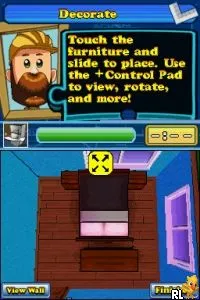
The game loads when you press Play · press “Play Now” inside the game if it asks.
Our House (USA)
Our House
Our House Overview
- Nintendo DS
- Simulation
- 5· 0 votes
GAME INFO
- Platform
- Nintendo DS
- Genre
- Simulation
- Players
- 1
- Region
- USA
How to play Our House online
To get started in Our House, you will first need to create your character and set up your initial home environment. The game guides you through selecting your home's layout and the style of furnishings you want to use. As you progress, you'll earn points or currency that can be spent on new items and decorations.
The core loop involves decorating and managing your home while engaging in various mini-games or tasks that may arise as you interact with different elements of the game. Pay attention to your character's needs and preferences, as satisfying these will enhance your gameplay experience. Although the game is straightforward, exploring different design combinations can lead to enjoyable outcomes.
CONTROLS
Controls
- Arrow Keys — D-Pad / Movement
- X — A button
- S — B button
- Z — Y button
- A — X button
- Q — L shoulder
- E — R shoulder
- Enter — Start
- V — Select
Our House FAQ
Which regions was Our House released in?
The game was primarily released in the USA. There isn’t much documentation available regarding other regions.
Roughly how long does it take to finish Our House?
Completion time can vary significantly based on player engagement and creativity, but expect it to take several hours to fully explore its content.
Is there anything iconic or memorable about Our House?
The game's focus on home decoration and customization makes it memorable for players who enjoy simulation experiences. However, it doesn't have standout features that distinguish it dramatically from other titles in the genre.
You may also like
All Nintendo DS games




GAME INFO
- Platform
- Nintendo DS
- Genre
- Simulation
- Players
- 1
- Region
- USA
COMMENTS (0)
No comments yet. Be the first to share your thoughts.