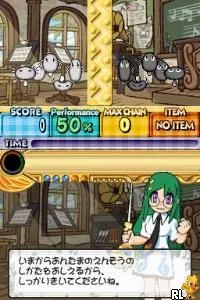
Ontama - Onpu-tou Hen (Japan)
Ontama - Onpu-tou Hen (Japan): NDS Music
Ontama - Onpu-tou Hen is a music-based game for the Nintendo DS, released exclusively in Japan. Developed by the well-known team at Konami, this title falls under the rhythm genre, which was quite popular during the DS era. Players engage with music in an interactive way, making it a unique addition to the library of rhythm games available on this platform.
In Ontama, players interact with various musical elements through touch and stylus controls. The game utilizes the DS's dual screens to present players with notes and rhythms that they must hit in time with the music. This mechanic not only challenges players to keep up with the beat but also encourages them to develop a sense of timing and rhythm, which are essential for mastering the game.
What makes Ontama worth trying today is its nostalgic charm and the way it captures the essence of music gaming from the mid-2000s. While it may not be as widely recognized as titles like Elite Beat Agents or Ouendan, it provides a different flavor of gameplay that can appeal to rhythm game enthusiasts. The simplicity of its mechanics makes it accessible, yet it offers enough challenge to engage players looking for a fun way to enjoy music on their DS.
How to Play Ontama - Onpu-tou Hen (Japan) Online
To get started with Ontama, first select your game mode from the main menu. Since this title is in Japanese, you may want to familiarize yourself with basic menu navigation. Look for options that indicate playing a song or practicing to get a feel for the controls and mechanics.
The core loop of the game revolves around hitting notes in time with the music. As the notes scroll down the screen, use the stylus or buttons to tap in rhythm. Pay attention to the timing, as hitting notes perfectly will yield better scores. Practice is key to improving your performance and unlocking new content.
Ontama - Onpu-tou Hen (Japan) Keyboard Controls
Controls
- Arrow Keys — D-Pad / Movement
- X — A button
- S — B button
- Z — Y button
- A — X button
- Q — L shoulder
- E — R shoulder
- Enter — Start
- V — Select
Comments (0)