The game loads when you press Play · press “Play Now” inside the game if it asks.
Nihonshi DS (Japan)
Nihonshi DS
Nihonshi DS: NDS Educational
- Nintendo DS
- Educational
- 5· 0 votes
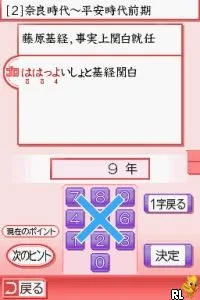
Nihonshi DS is a Japanese educational title released on the Nintendo DS. It aims to teach players about Japanese history and culture, making it a unique addition to the DS library. Developed specifically for the Japanese market, this game falls under the educational genre, which was a growing trend during the handheld era of gaming.
In this game, players engage with various aspects of Japanese history through interactive quizzes and mini-games. The gameplay is structured around answering questions, solving puzzles, and completing challenges that revolve around historical events and figures. Players will need to think critically and apply their knowledge of Japanese culture, making it not just a game but also a learning experience.
Nihonshi DS is worth exploring for those interested in educational games, especially if they have a keen interest in Japanese history. While it may not have the broad appeal of more action-oriented titles, its niche focus provides a unique experience that can be both fun and informative. It stands as a testament to the DS's versatility, showcasing how gaming can be used as a tool for education rather than just entertainment.
GAME INFO
- Platform
- Nintendo DS
- Genre
- Educational
- Players
- 1
- Region
- Japan
How to play Nihonshi DS online
Getting started with Nihonshi DS involves navigating through the main menu, which is entirely in Japanese. Players will select options that lead to quizzes and activities related to Japanese history. Familiarizing yourself with basic menu navigation will help, as the game is structured around question and answer formats that require some understanding of the content.
The core loop of gameplay revolves around answering questions correctly to progress through different historical topics. Players will find themselves challenged to recall facts and details about Japanese culture, which can be both rewarding and educational. As you progress, be prepared for a mix of question types and interactive elements that keep the learning process engaging.
CONTROLS
Controls
- Arrow Keys — D-Pad / Movement
- X — A button
- S — B button
- Z — Y button
- A — X button
- Q — L shoulder
- E — R shoulder
- Enter — Start
- V — Select
Nihonshi DS FAQ
Can players save progress in Nihonshi DS?
Progress saving details are not widely documented, but many educational games of this era typically allow for some form of progress retention.
Which regions was Nihonshi DS released in?
Nihonshi DS was released exclusively in Japan, targeting the local market with its educational content.
Is there anything iconic or memorable about Nihonshi DS?
The game is notable for its focus on Japanese history and culture, making it a unique entry in the DS library that stands out among typical entertainment titles.
You may also like
All Nintendo DS games











GAME INFO
- Platform
- Nintendo DS
- Genre
- Educational
- Players
- 1
- Region
- Japan
COMMENTS (0)
No comments yet. Be the first to share your thoughts.