CHOOSE A VERSION
3 versions · same consoleChoose an original release, regional version, revision, bootleg or clearly labelled ROM hack/mod, then press Play. Hacks may change the gameplay. Switching versions restarts the player.
Selected: Default · USA · En,Ja · USA
The game loads when you press Play · press “Play Now” inside the game if it asks.
Neves (USA) (En,Ja)
Neves
Neves on NDS
- Nintendo DS
- Puzzle
- 5· 0 votes
GAME INFO
- Platform
- Nintendo DS
- Genre
- Puzzle
- Publisher
- Yuke's
- Developer
- Yuke's
- Released
- 2007
- Players
- 1
- Region
- USA
How to play Neves online
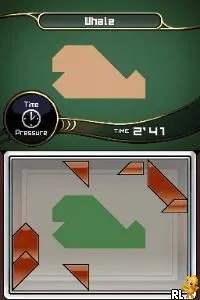
To start playing Neves, select the game from your menu and choose your preferred language if prompted. The gameplay revolves around solving puzzles by arranging pieces to match specific shapes. Familiarize yourself with the controls, as they will be essential for manipulating the pieces effectively.
The core loop involves selecting pieces and placing them on the grid to complete the shapes shown in the puzzles. As you progress, the puzzles may become more complex, requiring strategic thinking and careful planning. Take your time to analyze each puzzle before making your moves, as this can significantly impact your success.
CONTROLS
Controls
- Arrow Keys — D-Pad / Movement
- X — A button
- S — B button
- Z — Y button
- A — X button
- Q — L shoulder
- E — R shoulder
- Enter — Start
- V — Select
Neves FAQ
Is there anything iconic or memorable about Neves?
Neves is known for its straightforward and engaging puzzle mechanics that appeal to fans of the genre. While not widely celebrated, its simplicity and charm provide a nostalgic experience for players.
Is Neves considered easy to pick up or challenging?
The game is generally considered easy to pick up due to its intuitive controls and simple mechanics. However, the puzzles can become increasingly challenging, requiring players to think critically as they progress.
Does Neves have a multiplayer or co-op mode?
There is no multiplayer or co-op mode in Neves, as it is designed as a single-player puzzle experience. Players can focus on solving puzzles at their own pace without competition.
You may also like
All Nintendo DS games











GAME INFO
- Platform
- Nintendo DS
- Genre
- Puzzle
- Publisher
- Yuke's
- Developer
- Yuke's
- Released
- 2007
- Players
- 1
- Region
- USA
COMMENTS (0)
No comments yet. Be the first to share your thoughts.