The game loads when you press Play · press “Play Now” inside the game if it asks.
Neko Neko Bakery DS (Japan)
Neko Neko Bakery DS
Neko Neko Bakery DS: NDS Simulation
- Nintendo DS
- Simulation
- 5· 0 votes
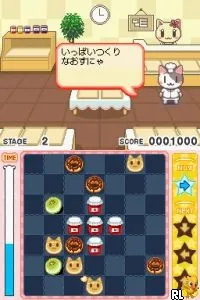
Neko Neko Bakery DS is a Japanese title released for the Nintendo DS. It falls under the simulation genre, allowing players to manage a bakery with a cute cat theme. The game was developed in Japan, and while specific details about the development team are not widely documented, it is known for its charming aesthetic and casual gameplay mechanics.
In Neko Neko Bakery DS, players take on the role of a bakery owner, where they create various baked goods and serve them to customers. The gameplay revolves around managing resources, preparing recipes, and fulfilling orders. While the exact mechanics are not widely documented, players typically engage in tasks like mixing ingredients and baking items, all while trying to satisfy the demands of their virtual patrons.
This title is worth exploring for those who enjoy niche simulation games, especially with a whimsical theme. While it may not have the widespread appeal of larger franchises, it offers a relaxing experience that can be a nice break from more action-oriented games. Its unique charm and the casual gameplay loop make it a delightful addition to any collection, particularly for fans of retro titles or simulation games on the DS.
GAME INFO
- Platform
- Nintendo DS
- Genre
- Simulation
- Players
- 1
- Region
- Japan
How to play Neko Neko Bakery DS online
Getting started in Neko Neko Bakery DS involves navigating through the menus, which are primarily in Japanese. Players should familiarize themselves with the layout and basic commands to progress. The core gameplay loop will typically involve gathering ingredients, preparing items, and serving customers, so it's essential to keep an eye on inventory and customer satisfaction.
As you play, managing time efficiently is crucial. Balancing the preparation of baked goods with the incoming orders is key to success. While the menus may present a challenge for non-Japanese speakers, taking the time to explore and experiment can lead to a rewarding experience in running your virtual bakery.
CONTROLS
Controls
- Arrow Keys — D-Pad / Movement
- X — A button
- S — B button
- Z — Y button
- A — X button
- Q — L shoulder
- E — R shoulder
- Enter — Start
- V — Select
Neko Neko Bakery DS FAQ
Is Neko Neko Bakery DS an official release, a fan hack, a prototype, or another kind of build?
This game is an official release for the Nintendo DS, specifically targeted at the Japanese market. It is not a fan hack or prototype, making it a genuine title from its era.
In what year was Neko Neko Bakery DS originally released?
The exact release year of Neko Neko Bakery DS is not widely documented. However, it was launched during the Nintendo DS era, which spanned from 2004 to 2013.
What makes Neko Neko Bakery DS stand out among Nintendo DS titles of its era?
The game is notable for its charming cat-themed bakery simulation, offering a unique and relaxing gameplay experience. Though it may not be as well-known as other titles, its niche focus on bakery management provides a different flavor compared to more action-oriented games available on the platform.
You may also like
All Nintendo DS games











GAME INFO
- Platform
- Nintendo DS
- Genre
- Simulation
- Players
- 1
- Region
- Japan
COMMENTS (0)
No comments yet. Be the first to share your thoughts.