CHOOSE A VERSION
2 versions · same consoleChoose an original release, regional version, revision, bootleg or clearly labelled ROM hack/mod, then press Play. Hacks may change the gameplay. Switching versions restarts the player.
Selected: Default · Europe · En,De,Es,It,Nl · Europe
The game loads when you press Play · press “Play Now” inside the game if it asks.
My Horse Club (Europe) (En,De,Es,It,Nl)
My Horse Club
My Horse Club on NDS
- Nintendo DS
- Simulation
- 5· 0 votes
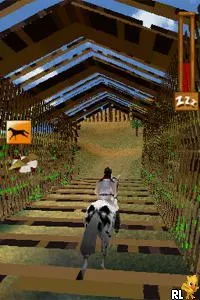
My Horse Club (Europe) (En,De,Es,It,Nl) is a simulation game for the Nintendo DS, released in Europe. This title falls under the genre of simulation and focuses on the world of horse riding and care. While the exact developer is not widely documented, the game is known for providing a unique experience for fans of equestrian activities on the portable platform.
In the game, players engage in various activities centered around horse care and riding. You can customize your horse, participate in competitions, and explore different environments related to equestrian life. The gameplay often includes feeding, grooming, and training your horse, making it an interactive experience that appeals to those who enjoy simulation games.
Despite being a niche title, My Horse Club offers a charming glimpse into horse ownership and care, especially for younger audiences or those new to the genre. It stands alongside other simulation games of its era, like the Animal Crossing series, but with a specific focus on horses. If you're looking for a lighthearted and casual simulation experience, this game might just be worth a try.
GAME INFO
- Platform
- Nintendo DS
- Genre
- Simulation
- Players
- 1
- Region
- Europe
How to play My Horse Club online
Getting started in My Horse Club involves selecting your horse and customizing its appearance to your liking. After that, players can explore the game's environments, taking part in activities such as grooming and feeding your horse. The core loop revolves around building a bond with your horse while completing various tasks and challenges.
As you progress, you'll find opportunities to participate in competitions, which can enhance your horse's skills and unlock new features. It's important to manage your horse's health and happiness, as these factors will influence your performance in events. Familiarizing yourself with the game's mechanics early on will help you enjoy the full experience.
CONTROLS
Controls
- Arrow Keys — D-Pad / Movement
- X — A button
- S — B button
- Z — Y button
- A — X button
- Q — L shoulder
- E — R shoulder
- Enter — Start
- V — Select
My Horse Club FAQ
Does My Horse Club have a multiplayer or co-op mode?
There is no known multiplayer or co-op mode in My Horse Club; it is primarily a single-player experience.
Is My Horse Club exclusive to Nintendo DS or did it appear on other systems?
My Horse Club is exclusive to the Nintendo DS and has not been released on other systems.
Who developed My Horse Club?
The information regarding the developer of My Horse Club is not widely documented.
You may also like
All Nintendo DS games











GAME INFO
- Platform
- Nintendo DS
- Genre
- Simulation
- Players
- 1
- Region
- Europe
COMMENTS (0)
No comments yet. Be the first to share your thoughts.