CHOOSE A VERSION
2 versions · same consoleChoose an original release, regional version, revision, bootleg or clearly labelled ROM hack/mod, then press Play. Hacks may change the gameplay. Switching versions restarts the player.
- Default · Europe · En,Fr,De,Es,It
- Zennou Series Vol. 03 - Akiyama Jin Kyouju Kanshuu - Zennou JinJin 2 (Japan)
Selected: Default · Europe · En,Fr,De,Es,It · Europe
The game loads when you press Play · press “Play Now” inside the game if it asks.
MinDStorm 2 (Europe) (En,Fr,De,Es,It)
MinDStorm 2
What is MinDStorm 2?
- Nintendo DS
- Puzzle
- 5· 0 votes
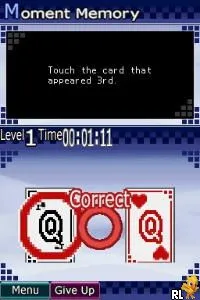
MinDStorm 2 is a puzzle game developed for the Nintendo DS, released in Europe. Known for its unique blend of strategy and logic, this title was designed to challenge players with various brain-teasing levels. While specific development details are scarce, it falls into the category of educational and puzzle games that were prevalent on handheld consoles during that era.
In MinDStorm 2, players navigate through a series of increasingly complex challenges that require critical thinking and problem-solving skills. The game presents a variety of puzzles that often involve manipulating objects or navigating mazes to achieve specific goals. It encourages a methodical approach, rewarding players for their ingenuity and persistence in tackling each level's unique mechanics.
This game is worth exploring today for those who appreciate puzzle genres or are looking for a nostalgic experience on the Nintendo DS. While it may not have the widespread acclaim of some other titles, its charm lies in its simplicity and the satisfaction of solving its puzzles. For fans of strategic thinking games, MinDStorm 2 offers a delightful diversion that showcases the creativity of its design, making it a solid addition to any retro gaming collection.
GAME INFO
- Platform
- Nintendo DS
- Genre
- Puzzle
- Players
- 1
- Region
- Europe
How to play MinDStorm 2 online
Getting started in MinDStorm 2 involves selecting a puzzle from the main menu. Once you dive into a level, the core loop revolves around analyzing the puzzle layout and determining the best strategy to progress. Pay attention to the various elements within each stage, as they often interact in ways that can help or hinder your progress.
As you play, focus on trial and error to discover the right solutions. Each puzzle is designed to encourage experimentation, so don’t hesitate to try different approaches. Make sure to keep track of what works and what doesn’t, as this will ultimately lead you to solving each challenge in the game.
CONTROLS
Controls
- Arrow Keys — D-Pad / Movement
- X — A button
- S — B button
- Z — Y button
- A — X button
- Q — L shoulder
- E — R shoulder
- Enter — Start
- V — Select
MinDStorm 2 FAQ
Is MinDStorm 2 an official release, a fan hack, a prototype, or another kind of build?
This title is an official release for the Nintendo DS, specifically tailored for the European market.
Is MinDStorm 2 exclusive to Nintendo DS or did it appear on other systems?
MinDStorm 2 is exclusive to the Nintendo DS and did not appear on other gaming platforms.
Does MinDStorm 2 have a multiplayer or co-op mode?
The game does not feature a multiplayer or co-op mode, focusing instead on single-player puzzle solving.
You may also like
All Nintendo DS games











GAME INFO
- Platform
- Nintendo DS
- Genre
- Puzzle
- Players
- 1
- Region
- Europe
COMMENTS (0)
No comments yet. Be the first to share your thoughts.