The game loads when you press Play · press “Play Now” inside the game if it asks.
Mensch Aergere Dich Nicht - Das Beliebte Original (Europe) (En,Fr,De)
Mensch Aergere Dich Nicht - Das Beliebte Original
Inside Mensch Aergere Dich Nicht - Das Beliebte Original
- Nintendo DS
- Board Game
- 5· 0 votes
GAME INFO
- Platform
- Nintendo DS
- Genre
- Board Game
- Players
- 1-4
- Region
- Europe
How to play Mensch Aergere Dich Nicht - Das Beliebte Original online
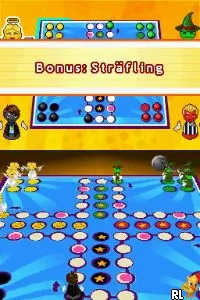
To start playing Mensch Aergere Dich Nicht, select the game mode you wish to play, whether against AI or with friends. The core loop revolves around rolling dice and moving your pieces strategically around the board. As you progress, you will need to decide whether to focus on advancing your pieces or blocking your opponents.
CONTROLS
Controls
- Arrow Keys — D-Pad / Movement
- X — A button
- S — B button
- Z — Y button
- A — X button
- Q — L shoulder
- E — R shoulder
- Enter — Start
- V — Select
Mensch Aergere Dich Nicht - Das Beliebte Original FAQ
Which regions was Mensch Aergere Dich Nicht - Das Beliebte Original released in?
The game was released in Europe, making it accessible to a wide audience familiar with the classic board game.
Does Mensch Aergere Dich Nicht - Das Beliebte Original have a multiplayer or co-op mode?
Multiplayer mode is available, allowing players to compete against each other, which enhances the fun and competitiveness of the game.
Is there anything iconic or memorable about Mensch Aergere Dich Nicht - Das Beliebte Original?
The game captures the essence of the original board game, making it memorable for fans who enjoy casual, strategic gameplay with friends and family.
You may also like
All Nintendo DS games











GAME INFO
- Platform
- Nintendo DS
- Genre
- Board Game
- Players
- 1-4
- Region
- Europe
COMMENTS (0)
No comments yet. Be the first to share your thoughts.