The game loads when you press Play · press “Play Now” inside the game if it asks.
Matchstick Puzzle by DS (Europe) (En,Fr,De,Es,It)
Matchstick Puzzle by DS
Inside Matchstick Puzzle by DS
- Nintendo DS
- Puzzle
- Fan Game
- 5· 0 votes
Unofficial fan game. The notes below come from community sources and have not been verified against the patch itself, so levels, mechanics and features may differ from what is described.
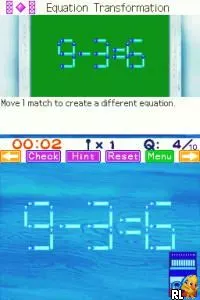
Matchstick Puzzle by DS is a puzzle game that was released in Europe for the Nintendo DS. It is a fan-made title that features gameplay centered around solving matchstick puzzles. This game allows players to manipulate matchsticks to form specific shapes or equations, which is a genre that has seen various iterations over the years on different platforms.
In gameplay, players are presented with a series of puzzles that require logical thinking and spatial reasoning. By moving or removing matchsticks, the goal is to achieve the target configuration as specified in each level. The game encourages players to think creatively, as some puzzles may have multiple solutions, making it a fun challenge for enthusiasts of the puzzle genre.
Today, Matchstick Puzzle is worth trying if you enjoy brain teasers and logical challenges. While it may not have the same level of recognition as other DS titles, it fits well within the library of puzzle games available on the platform. Its simple mechanics and engaging puzzles make it a nice diversion, especially for those who appreciate the more niche offerings of retro gaming.
GAME INFO
- Platform
- Nintendo DS
- Genre
- Puzzle
- Players
- 1
- Region
- Europe
How to play Matchstick Puzzle by DS online
To get started in Matchstick Puzzle, begin by selecting a level from the main menu. Each level presents a unique puzzle where your objective is to rearrange the matchsticks to form the desired shape or equation. As you progress, the difficulty will increase, requiring more complex problem-solving skills.
The core loop involves examining the puzzle, strategizing your moves, and then executing them to test your solutions. Keep in mind that some puzzles may have more than one solution, so don't hesitate to experiment with different configurations. Pay attention to the hints provided, as they can guide you through tougher challenges.
CONTROLS
Controls
- Arrow Keys — D-Pad / Movement
- X — A button
- S — B button
- Z — Y button
- A — X button
- Q — L shoulder
- E — R shoulder
- Enter — Start
- V — Select
Matchstick Puzzle by DS FAQ
Can players save progress in Matchstick Puzzle by DS?
The game does not widely document a save feature, so it is likely that progress cannot be saved.
In what year was Matchstick Puzzle by DS originally released?
The original release year for Matchstick Puzzle by DS is not widely documented.
Who developed Matchstick Puzzle by DS?
The developer of Matchstick Puzzle by DS is not widely documented.
You may also like
All Nintendo DS games











GAME INFO
- Platform
- Nintendo DS
- Genre
- Puzzle
- Players
- 1
- Region
- Europe
COMMENTS (0)
No comments yet. Be the first to share your thoughts.