CHOOSE A VERSION
3 versions · same consoleChoose an original release, regional version, revision, bootleg or clearly labelled ROM hack/mod, then press Play. Hacks may change the gameplay. Switching versions restarts the player.
- Default · USA
- Dungeon Maker - Mahou no Shovel to Chiisana Yuusha (Japan)
- Dungeon Maker (Europe) (En,Fr,De,Es,It)
Selected: Default · USA · USA
The game loads when you press Play · press “Play Now” inside the game if it asks.
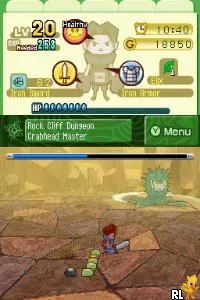
Master of the Monster Lair (USA)
Master of the Monster Lair
About Master of the Monster Lair
- Nintendo DS
- Action
- 5· 0 votes
GAME INFO
- Platform
- Nintendo DS
- Genre
- Action
- Released
- 2007
- Players
- 1
- Region
- USA
How to play Master of the Monster Lair online
CONTROLS
Controls
- Arrow Keys — D-Pad / Movement
- X — A button
- S — B button
- Z — Y button
- A — X button
- Q — L shoulder
- E — R shoulder
- Enter — Start
- V — Select
Master of the Monster Lair FAQ
Can players save progress in Master of the Monster Lair?
The game allows players to save their progress at specific checkpoints throughout the levels. This feature is essential for managing the sometimes challenging gameplay.
In what year was Master of the Monster Lair originally released?
The game was released in 2007, during a period when the Nintendo DS was gaining popularity with a diverse library of titles. It reflects the trends and styles of that gaming era.
Which regions was Master of the Monster Lair released in?
Master of the Monster Lair was primarily released in the USA. It is not widely documented whether it saw a release in other regions, such as Europe or Japan.
You may also like
All Nintendo DS games





GAME INFO
- Platform
- Nintendo DS
- Genre
- Action
- Released
- 2007
- Players
- 1
- Region
- USA
COMMENTS (0)
No comments yet. Be the first to share your thoughts.