CHOOSE A VERSION
3 versions · same consoleChoose an original release, regional version, revision, bootleg or clearly labelled ROM hack/mod, then press Play. Hacks may change the gameplay. Switching versions restarts the player.
- Default · USA
- Magic Made Fun - Perform Tricks That Will Amaze Your Friends! (Europe) (En,Fr,De,Es,It)
- Magic Taizen (Japan)
Selected: Default · USA · USA
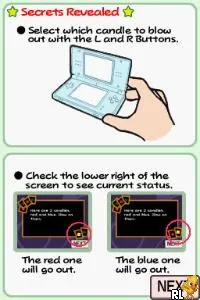
The game loads when you press Play · press “Play Now” inside the game if it asks.
Master of Illusion (USA)
Master of Illusion
Master of Illusion - Puzzle Classic
- Nintendo DS
- Puzzle
- 5· 0 votes
Master of Illusion (USA) is a unique title for the Nintendo DS, released in 2007. Developed by Nintendo, this game falls into the puzzle genre and utilizes the DS's dual screens and touch controls to create an engaging experience. It is not a hack or mod, but an official release that showcases the capabilities of the handheld console.
In Master of Illusion, players engage in a variety of mini-games that revolve around card tricks and illusions, using the DS stylus for interactive gameplay. The game includes different card-based puzzles and challenges that require players to think critically and creatively. Players can also create their own magic shows, which adds a personal touch to the gameplay experience.
This title is worth exploring for those interested in casual gaming with a magical twist. While it may not have the depth of some other DS games, its charm lies in its lighthearted approach to puzzles and the unique use of the DS's features. It serves as a nice diversion for players looking for something different, especially in the realm of party games or for those who enjoy magic-themed content.
GAME INFO
- Platform
- Nintendo DS
- Genre
- Puzzle
- Publisher
- Nintendo
- Developer
- Tenyo
- Released
- 2007
- Players
- 1
- Region
- USA
How to play Master of Illusion online
To start playing Master of Illusion, select the main game mode from the menu after launching. The game presents various mini-games that involve card tricks and illusions, so familiarizing yourself with the different challenges is essential. The core loop typically involves completing these mini-games to unlock new content and create your own magic shows.
As you play, pay attention to the instructions for each mini-game, as they will guide you on how to use the touch controls effectively. Mastery of the stylus mechanics is crucial, as many puzzles require precise movements. Experiment with different strategies to find what works best for each illusion, and have fun with the creative aspects of putting together magic shows.
CONTROLS
Controls
- Arrow Keys — D-Pad / Movement
- X — A button
- S — B button
- Z — Y button
- A — X button
- Q — L shoulder
- E — R shoulder
- Enter — Start
- V — Select
Master of Illusion FAQ
Is Master of Illusion exclusive to Nintendo DS or did it appear on other systems?
This game is exclusive to the Nintendo DS and did not appear on other systems.
Does Master of Illusion have a multiplayer or co-op mode?
Master of Illusion does not feature a multiplayer or co-op mode; it is designed for single-player experiences only.
Who developed Master of Illusion?
Nintendo developed Master of Illusion, showcasing their ability to create engaging and innovative titles for the DS platform.
You may also like
All Nintendo DS games








GAME INFO
- Platform
- Nintendo DS
- Genre
- Puzzle
- Publisher
- Nintendo
- Developer
- Tenyo
- Released
- 2007
- Players
- 1
- Region
- USA
COMMENTS (0)
No comments yet. Be the first to share your thoughts.