The game loads when you press Play · press “Play Now” inside the game if it asks.
Mage Knight - Destiny's Soldier (USA)
Mage Knight - Destiny's Soldier
Mage Knight - Destiny's Soldier - RPG Classic
- Nintendo DS
- RPG
- 5· 0 votes
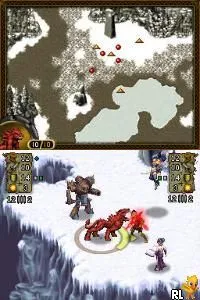
Mage Knight - Destiny's Soldier is a tactical RPG released for the Nintendo DS in the USA. Developed during the mid-2000s, it is part of the Mage Knight franchise, which is known for blending tabletop mechanics with digital gameplay. This title allows players to explore a fantasy world filled with strategic battles and character development.
In the game, players take on the role of a hero navigating through various quests and challenges. The gameplay emphasizes turn-based combat, where strategic positioning and character abilities are key to overcoming enemies. Players will find themselves managing resources, leveling up characters, and making tactical decisions that impact the outcome of battles.
Today, Mage Knight - Destiny's Soldier holds a niche appeal, especially among fans of tactical RPGs. While it may not have the same recognition as larger franchises, it offers a unique blend of strategy and storytelling that can be enjoyable for those who appreciate the genre. It serves as a solid example of handheld RPGs of its time, capturing the essence of strategy gaming on the go.
GAME INFO
- Platform
- Nintendo DS
- Genre
- RPG
- Released
- 2006
- Players
- 1
- Region
- USA
How to play Mage Knight - Destiny's Soldier online
Getting started in Mage Knight - Destiny's Soldier involves choosing your character and setting off into a world of tactical battles. As you begin, familiarize yourself with the controls and the layout of the menus. The game typically guides you through initial quests that help you understand the mechanics of combat and exploration.
The core loop revolves around engaging in turn-based battles, leveling up your characters, and managing your resources effectively. Focus on strategic positioning during fights and make decisions that will enhance your character's abilities. The game rewards thoughtful play, so take your time to explore and grasp the various mechanics present as you advance through the story.
CONTROLS
Controls
- Arrow Keys — D-Pad / Movement
- X — A button
- S — B button
- Z — Y button
- A — X button
- Q — L shoulder
- E — R shoulder
- Enter — Start
- V — Select
Mage Knight - Destiny's Soldier FAQ
Roughly how long does it take to finish Mage Knight - Destiny's Soldier?
Completion times can vary based on play style, but many players report finishing the game in approximately 15 to 20 hours.
Does Mage Knight - Destiny's Soldier have a multiplayer or co-op mode?
The game does not include a multiplayer or co-op mode; it is designed solely for single-player gameplay.
Who developed Mage Knight - Destiny's Soldier?
The specific development team behind this title is not widely documented, but it is part of the Mage Knight franchise known for its blend of tabletop and digital gaming.
You may also like
All Nintendo DS games




GAME INFO
- Platform
- Nintendo DS
- Genre
- RPG
- Released
- 2006
- Players
- 1
- Region
- USA
COMMENTS (0)
No comments yet. Be the first to share your thoughts.