The game loads when you press Play · press “Play Now” inside the game if it asks.
Maeh Jongg DS (Germany)
Maeh Jongg DS
Maeh Jongg DS: NDS Puzzle
- Nintendo DS
- Puzzle
- 5· 0 votes
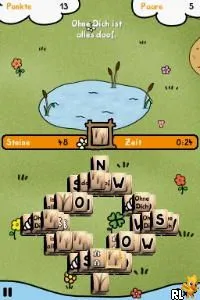
Maeh Jongg DS (Germany) is a puzzle game available on the Nintendo DS platform. Released in Europe, this title is part of the Mahjong genre, which is rooted in tile-matching gameplay. The specific details about its developer and publisher are not widely documented, which is common for many niche titles from this era.
In Maeh Jongg DS, players engage in classic Mahjong tile-matching mechanics. The objective is to clear the board by matching pairs of tiles, showcasing strategic thinking and pattern recognition. The game likely includes various layouts and challenges, typical of the genre, but specific gameplay mechanics beyond this are not detailed in available sources.
This title is worth exploring for fans of Mahjong and puzzle enthusiasts, especially those who appreciate retro gaming. While it may not have the same level of recognition as major franchises, it offers a straightforward and relaxing gaming experience. It serves as a good example of the genre during the Nintendo DS era, appealing to those who enjoy simpler puzzle games without the complexity of modern titles.
GAME INFO
- Platform
- Nintendo DS
- Genre
- Puzzle
- Players
- 1
- Region
- Europe
How to play Maeh Jongg DS online
Getting started in Maeh Jongg DS involves selecting a game mode from the main menu, which may include options like single-player or various puzzle challenges. Players will match pairs of tiles to clear the board, following the traditional rules of Mahjong. It's essential to look for tiles that are free and can be matched to progress through the levels.
As you play, pay attention to the layout of the tiles, as some configurations will require strategic thinking to find matches. The game likely offers hints or a limited number of moves, so players should plan their moves carefully. Familiarizing yourself with the tile types and layout will enhance your overall experience, making it easier to tackle the puzzles ahead.
CONTROLS
Controls
- Arrow Keys — D-Pad / Movement
- X — A button
- S — B button
- Z — Y button
- A — X button
- Q — L shoulder
- E — R shoulder
- Enter — Start
- V — Select
Maeh Jongg DS FAQ
What type of game is Maeh Jongg DS?
This title is a puzzle game centered around the classic Mahjong mechanics, where players match pairs of tiles to clear the board.
Is Maeh Jongg DS exclusive to Nintendo DS or did it appear on other systems?
Currently, there is no widely documented evidence that Maeh Jongg DS was released on any other systems besides the Nintendo DS.
Who developed Maeh Jongg DS?
Information regarding the specific developer of Maeh Jongg DS is not widely documented, making it difficult to identify the team behind its creation.
You may also like
All Nintendo DS games











GAME INFO
- Platform
- Nintendo DS
- Genre
- Puzzle
- Players
- 1
- Region
- Europe
COMMENTS (0)
No comments yet. Be the first to share your thoughts.