The game loads when you press Play · press “Play Now” inside the game if it asks.
M&M's - Kart Racing (USA) (Rev 1)
M&M's - Kart Racing
Inside M&M's - Kart Racing
- Nintendo DS
- Racing
- Revision
- 5· 0 votes
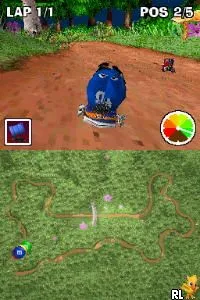
M&M's - Kart Racing (USA) (Rev 1) is a revision of a racing game released for the Nintendo DS. This title, part of the M&M's franchise, blends the familiar candy-themed aesthetic with kart racing mechanics popularized by titles like Mario Kart. While not widely documented, the game is known for its light-hearted approach and colorful graphics, typical of its era and genre.
In this game, players engage in kart racing across various tracks featuring iconic M&M's branding. The gameplay involves racing against AI opponents or friends, utilizing power-ups and speed boosts to gain an advantage. The controls are straightforward, allowing players to navigate the courses while collecting items and avoiding obstacles, a hallmark of kart racing games from this period.
What makes M&M's - Kart Racing worth exploring today is its nostalgic appeal for fans of the franchise and the kart racing genre. While it may not reach the heights of more prominent titles, it captures the essence of fun, accessible racing for players of all ages. Its simple mechanics and charming visuals provide a nice diversion for those looking to enjoy a light-hearted racing experience on the Nintendo DS.
GAME INFO
- Platform
- Nintendo DS
- Genre
- Racing
- Players
- 1-2
- Region
- USA
- Version
- Rev 1
How to play M&M's - Kart Racing online
Getting started in M&M's - Kart Racing involves selecting your character and kart before jumping into the race. The core loop consists of racing through various tracks, collecting items, and trying to outpace your opponents. Players should familiarize themselves with the controls to effectively navigate the courses and utilize power-ups strategically.
As you progress, mastering the tracks and learning the best times to use items can significantly enhance your chances of winning. Pay attention to the layout of each course, as some may have shortcuts or tricky turns that can affect your performance. Practice makes perfect, especially in a genre that rewards skillful driving and quick decision-making.
CONTROLS
Controls
- Arrow Keys — D-Pad / Movement
- X — A button
- S — B button
- Z — Y button
- A — X button
- Q — L shoulder
- E — R shoulder
- Enter — Start
- V — Select
M&M's - Kart Racing FAQ
Does M&M's - Kart Racing have a multiplayer or co-op mode?
The game supports multiplayer racing, allowing players to compete against each other in various modes. This adds an extra layer of fun, especially when racing with friends.
Is M&M's - Kart Racing exclusive to Nintendo DS or did it appear on other systems?
This title is primarily known as a Nintendo DS release, and there is no widely documented evidence of it appearing on other platforms. It remains a unique experience for DS owners.
Is M&M's - Kart Racing considered easy to pick up or challenging?
Many players find the game easy to pick up due to its simple controls and straightforward mechanics. However, mastering the tracks and competing against others can present a challenge, especially for those seeking to improve their racing skills.
You may also like
All Nintendo DS games











GAME INFO
- Platform
- Nintendo DS
- Genre
- Racing
- Players
- 1-2
- Region
- USA
- Version
- Rev 1
COMMENTS (0)
No comments yet. Be the first to share your thoughts.