The game loads when you press Play · press “Play Now” inside the game if it asks.
Kirikou and the Wild Beasts (Europe) (En,Fr,De,Es,It)
Kirikou and the Wild Beasts
Getting to Know Kirikou and the Wild Beasts
- Nintendo DS
- Platformer
- 5· 0 votes
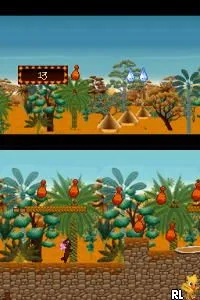
Kirikou and the Wild Beasts is a platformer game released for the Nintendo DS in Europe. This title was developed by the French studio, Aardman Animations, known for their unique animation style and storytelling. The game is based on the animated film Kirikou and the Sorceress, and it offers a vibrant world inspired by African culture and folklore.
In Kirikou and the Wild Beasts, players take on the role of Kirikou, a small but brave boy. The gameplay revolves around navigating through various levels, solving puzzles, and overcoming obstacles. Players encounter different creatures and challenges that require quick reflexes and strategic thinking to progress through the game.
This title is worth trying for its charming graphics and cultural themes, which set it apart from many other platformers of its time. While it may not be as well-known as other Nintendo DS titles, it offers a unique experience that blends education and entertainment. Fans of the platforming genre looking for something different will appreciate the game's approach to storytelling and gameplay mechanics.
GAME INFO
- Platform
- Nintendo DS
- Genre
- Platformer
- Developer
- Wizarbox
- Released
- 2005
- Players
- 1
- Region
- Europe
How to play Kirikou and the Wild Beasts online
Getting started in Kirikou and the Wild Beasts involves selecting your save file and diving into the first level. As Kirikou, you will explore lush environments filled with various animals and obstacles. The goal is to reach the end of each level while collecting items and avoiding dangers.
The core loop of the game includes running, jumping, and interacting with elements in the environment. You'll need to pay attention to your surroundings, as some creatures can help you while others present challenges. Mastering the controls is essential for navigating the levels effectively and enjoying the game to its fullest.
CONTROLS
Controls
- Arrow Keys — D-Pad / Movement
- X — A button
- S — B button
- Z — Y button
- A — X button
- Q — L shoulder
- E — R shoulder
- Enter — Start
- V — Select
Kirikou and the Wild Beasts FAQ
Roughly how long does it take to finish Kirikou and the Wild Beasts?
The game typically takes around 5 to 8 hours to complete, depending on the player's skill and exploration style.
In what year was Kirikou and the Wild Beasts originally released?
The game was released in 2005, aligning with the popularity of the animated film it is based on.
Who developed Kirikou and the Wild Beasts?
The game was developed by Aardman Animations, a studio well-known for its work in animation and storytelling.
You may also like
All Nintendo DS games







GAME INFO
- Platform
- Nintendo DS
- Genre
- Platformer
- Developer
- Wizarbox
- Released
- 2005
- Players
- 1
- Region
- Europe
COMMENTS (0)
No comments yet. Be the first to share your thoughts.