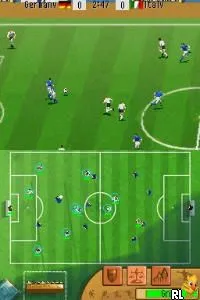
The game loads when you press Play · press “Play Now” inside the game if it asks.
Ico Soccer (Europe) (En,Fr,De,Es,It)
Ico Soccer
Ico Soccer - Sports Classic
- Nintendo DS
- Sports
- 5· 0 votes
GAME INFO
- Platform
- Nintendo DS
- Genre
- Sports
- Players
- 1-2
- Region
- Europe
How to play Ico Soccer online
To get started in Ico Soccer, choose your team and set up a match against either AI or a friend. The game allows you to select different teams, each with unique attributes that may influence gameplay. Familiarize yourself with the controls and experiment with different strategies as you play your matches.
The core loop involves moving your players across the field, passing the ball, and attempting to score goals against your opponent. Timing and positioning are key, as you'll want to make strategic passes and take shots at the right moments. As you play, you can learn various tactics to outmaneuver the opposing team and improve your skills for future matches.
CONTROLS
Controls
- Arrow Keys — D-Pad / Movement
- X — A button
- S — B button
- Z — Y button
- A — X button
- Q — L shoulder
- E — R shoulder
- Enter — Start
- V — Select
Ico Soccer FAQ
Can players save progress in Ico Soccer?
Saving progress in Ico Soccer is not widely documented, so it is unclear if the game has a save feature or how it might work.
Does Ico Soccer have a multiplayer or co-op mode?
The game does support multiplayer, allowing players to compete against each other in soccer matches, which adds an engaging social element to the gameplay.
Is there anything iconic or memorable about Ico Soccer?
Ico Soccer doesn't have widely recognized iconic elements or characters, but its straightforward gameplay and nostalgic feel can resonate with fans of retro sports games.
You may also like
All Nintendo DS games







GAME INFO
- Platform
- Nintendo DS
- Genre
- Sports
- Players
- 1-2
- Region
- Europe
COMMENTS (0)
No comments yet. Be the first to share your thoughts.