The game loads when you press Play · press “Play Now” inside the game if it asks.
Gilde DS, Die (Europe) (En,Fr,De)
Gilde DS, Die
Gilde DS, Die - RPG Classic
- Nintendo DS
- RPG
- 5· 0 votes
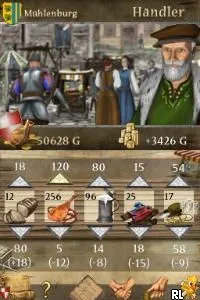
Gilde DS, Die (Europe) (En,Fr,De) is a title for the Nintendo DS that falls into the genre of RPG. It was released in Europe and supports multiple languages including English, French, and German. The game seems to be a localized version, but specific details about its developer and publisher are not widely documented.
In Gilde DS, players engage in typical RPG mechanics where exploration, character development, and turn-based combat are key components. The game likely incorporates quests and interactions with NPCs, which is standard for the RPG genre on the DS. However, exact gameplay mechanics and character progression details are not extensively documented, leaving some aspects to be inferred from the genre conventions of the time.
Despite being a lesser-known title, Gilde DS, Die offers a unique experience for fans of retro RPGs on the Nintendo DS. It stands alongside other RPGs of its era, providing nostalgic elements that may appeal to collectors and those interested in exploring the breadth of the platform's library. While it may not have the same recognition as more prominent titles, it holds a niche appeal for retro enthusiasts looking to uncover hidden gems.
GAME INFO
- Platform
- Nintendo DS
- Genre
- RPG
- Region
- Europe
How to play Gilde DS, Die online
Getting started in Gilde DS involves navigating through menus and familiarizing yourself with the game’s interface. Initially, players will create or select a character, which is a common first step in RPGs. The core gameplay loop revolves around completing quests, battling enemies, and upgrading your character’s skills and equipment.
As you progress, pay attention to the dialogue with NPCs, as this will guide you on where to go next and what tasks to complete. Engaging in battles will help level up your character, making it essential to balance exploration with combat. Understanding these basics will enhance your gameplay experience as you delve into this retro RPG.
CONTROLS
Controls
- Arrow Keys — D-Pad / Movement
- X — A button
- S — B button
- Z — Y button
- A — X button
- Q — L shoulder
- E — R shoulder
- Enter — Start
- V — Select
Gilde DS, Die FAQ
Is Gilde DS, Die exclusive to Nintendo DS or did it appear on other systems?
The game appears to be exclusive to the Nintendo DS, with no known releases on other systems.
Is Gilde DS, Die an official release, a fan hack, a prototype, or another kind of build?
This title is a localized version for the Nintendo DS, but specific details about its official status or development are not widely documented.
Who developed Gilde DS, Die?
Information regarding the developer of Gilde DS, Die is not widely documented, so it remains unclear who created this title.
You may also like
All Nintendo DS games











GAME INFO
- Platform
- Nintendo DS
- Genre
- RPG
- Region
- Europe
COMMENTS (0)
No comments yet. Be the first to share your thoughts.