The game loads when you press Play · press “Play Now” inside the game if it asks.
Gakken Hangeul Zanmai DS (Japan)
Gakken Hangeul Zanmai DS
About Gakken Hangeul Zanmai DS
- Nintendo DS
- Educational
- 5· 0 votes
GAME INFO
- Platform
- Nintendo DS
- Genre
- Educational
- Players
- 1
- Region
- Japan
How to play Gakken Hangeul Zanmai DS online
Getting Started
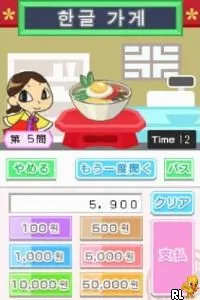
When you start Gakken Hangeul Zanmai DS, you'll be greeted with a Japanese menu screen. The main options typically include lessons, practice drills, and a review mode. Use the D-Pad to highlight an option and press X (A button) to enter. If you don't read Japanese, look for visual cues - icons for a pencil (writing), a book (lessons), or a test sheet often indicate the mode. The touch screen is central: most interactions involve tapping on displayed Hangeul characters or drawing them with the stylus.
The core loop consists of selecting a set of characters or words to study, then completing exercises. You might hear a pronunciation via the DS speakers and be asked to write the corresponding character. The game likely tracks your progress, marking characters as learned and offering review sessions. Start with the basic consonants and vowels, and use the reference chart that appears on the top screen if you need hints. Take your time - the emphasis is on accuracy, not speed.
Since this is a Japanese-language title, the interface may be confusing at first. Experiment with each menu option to understand its function. If you get stuck, online fan-made guides for Gakken DS edu-titles can provide translations of common menu terms. Remember that the goal is to build familiarity with Hangeul, so don't rush; repetition is built into the design.
CONTROLS
Controls
- Arrow Keys: D-Pad / Movement
- X: A button
- S: B button
- Z: Y button
- A: X button
- Q: L shoulder
- E: R shoulder
- Enter: Start
- V: Select
Gakken Hangeul Zanmai DS FAQ
Does Gakken Hangeul Zanmai DS have a multiplayer or co-op mode?
No multiplayer or co-op mode is available in this game. It is designed as a single-player educational experience.
What type of game is Gakken Hangeul Zanmai DS?
This title is an educational game focused on teaching players the Korean writing system, Hangeul. It incorporates various interactive exercises to facilitate learning.
Is Gakken Hangeul Zanmai DS considered easy to pick up or challenging?
The game is generally easy to pick up for those interested in learning Hangeul. However, players unfamiliar with the language may find some aspects challenging due to the Japanese menus.
You may also like
All Nintendo DS games











GAME INFO
- Platform
- Nintendo DS
- Genre
- Educational
- Players
- 1
- Region
- Japan
COMMENTS (0)
No comments yet. Be the first to share your thoughts.