CHOOSE A VERSION
3 versions · same consoleChoose an original release, regional version, revision, bootleg or clearly labelled ROM hack/mod, then press Play. Hacks may change the gameplay. Switching versions restarts the player.
Selected: Default · USA · En,Fr,De,Es,It · USA
The game loads when you press Play · press “Play Now” inside the game if it asks.
EA Playground (USA) (En,Fr,De,Es,It)
EA Playground
EA Playground: NDS Action
- Nintendo DS
- Action
- 5· 0 votes
GAME INFO
- Platform
- Nintendo DS
- Genre
- Action
- Publisher
- Electronic Arts
- Developer
- EA Vancouver
- Released
- 2007
- Players
- 1-4
- Region
- USA
How to play EA Playground online
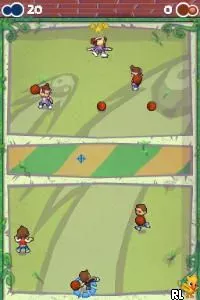
To get started in EA Playground, choose a mini-game from the main menu. You can play solo or against friends, so gather some players if you want to enjoy the multiplayer aspect. The core loop involves selecting a game, competing, and earning points to unlock more content or mini-games.
Each mini-game has its own rules and mechanics, so pay attention to the prompts when starting. Mastering the controls and understanding the objectives are key to doing well. Keep an eye out for power-ups or special items that can give you an edge during competitions.
CONTROLS
Controls
- Arrow Keys — D-Pad / Movement
- X — A button
- S — B button
- Z — Y button
- A — X button
- Q — L shoulder
- E — R shoulder
- Enter — Start
- V — Select
EA Playground FAQ
Can players save progress in EA Playground?
There is no traditional save system in EA Playground, as it is designed primarily for quick play sessions. Players can return to the main menu and choose any mini-game without needing to save progress.
In what year was EA Playground originally released?
EA Playground was originally released in 2007, coinciding with the peak popularity of the Nintendo DS. This was a time when casual gaming was becoming more mainstream, especially for portable consoles.
Is EA Playground exclusive to Nintendo DS or did it appear on other systems?
EA Playground was primarily released for the Nintendo DS, and there are no known versions for other systems. It was designed specifically to utilize the unique features of the DS, such as the touchscreen and microphone.
You may also like
All Nintendo DS games











GAME INFO
- Platform
- Nintendo DS
- Genre
- Action
- Publisher
- Electronic Arts
- Developer
- EA Vancouver
- Released
- 2007
- Players
- 1-4
- Region
- USA
COMMENTS (0)
No comments yet. Be the first to share your thoughts.