CHOOSE A VERSION
2 versions · same consoleChoose an original release, regional version, revision, bootleg or clearly labelled ROM hack/mod, then press Play. Hacks may change the gameplay. Switching versions restarts the player.
Selected: Default · USA · USA
The game loads when you press Play · press “Play Now” inside the game if it asks.
CrossworDS (USA)
CrossworDS
CrossworDS on NDS
- Nintendo DS
- Educational
- 5· 0 votes
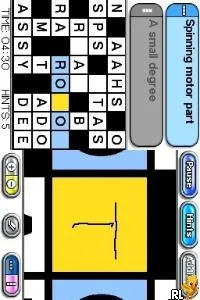
CrossworDS (USA) is a puzzle game released for the Nintendo DS, focusing on crossword challenges. Although specific details about its development remain scarce, it falls within the educational genre, a common category for titles on the platform during its era. The game is essentially a straightforward adaptation of crossword puzzles, appealing to those who enjoy word games and brain teasers.
In CrossworDS, players fill in crossword grids by solving clues provided for each word. The gameplay is simple yet engaging; as you progress, you'll encounter various levels of difficulty that cater to both casual players and seasoned crossword enthusiasts. The touch screen functionality of the DS enhances the experience, allowing for easy input and navigation as you work through the puzzles.
This title is worth exploring for fans of word puzzles, especially those looking for a portable experience. While it may not have the depth or variety of larger puzzle games, it serves as a solid option for quick, casual play. Given the popularity of puzzle games on the Nintendo DS, CrossworDS fits well within the library, offering a nostalgic way to enjoy classic crossword challenges on the go.
GAME INFO
- Platform
- Nintendo DS
- Genre
- Educational
- Publisher
- Nintendo
- Released
- 2008
- Players
- 1
- Region
- USA
How to play CrossworDS online
To get started with CrossworDS, choose a puzzle from the available options. Each puzzle will present a grid alongside clues that correspond to the words you need to fill in. As you solve the clues, begin entering answers into the grid using the stylus or buttons, depending on your preference. The game encourages you to think critically about the clues and their corresponding words.
The core loop revolves around solving each puzzle efficiently and correctly. Pay attention to the clues and the letters you've already placed, as they can provide hints for the remaining words. Completing puzzles not only gives a sense of achievement but also allows you to improve your vocabulary and puzzle-solving skills, making it a rewarding experience for players who enjoy word games.
CONTROLS
Controls
- Arrow Keys — D-Pad / Movement
- X — A button
- S — B button
- Z — Y button
- A — X button
- Q — L shoulder
- E — R shoulder
- Enter — Start
- V — Select
CrossworDS FAQ
Who developed CrossworDS?
Information about the developer of CrossworDS is not widely documented.
Which regions was CrossworDS released in?
This title was released in the USA, catering to the North American audience.
Is there anything iconic or memorable about CrossworDS?
CrossworDS is primarily recognized for its straightforward crossword puzzle gameplay, which appeals to fans of word games but lacks notable iconic features.
You may also like
All Nintendo DS games











GAME INFO
- Platform
- Nintendo DS
- Genre
- Educational
- Publisher
- Nintendo
- Released
- 2008
- Players
- 1
- Region
- USA
COMMENTS (0)
No comments yet. Be the first to share your thoughts.