CHOOSE A VERSION
3 versions · same consoleChoose an original release, regional version, revision, bootleg or clearly labelled ROM hack/mod, then press Play. Hacks may change the gameplay. Switching versions restarts the player.
Selected: Default · Europe · En,Fr,It · Europe
The game loads when you press Play · press “Play Now” inside the game if it asks.
Cosmetic Paradise (Europe) (En,Fr,It)
Cosmetic Paradise
Cosmetic Paradise - Simulation Classic
- Nintendo DS
- Simulation
- 5· 0 votes
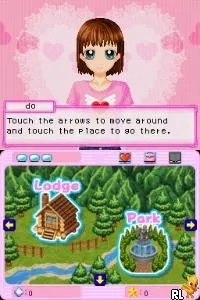
Cosmetic Paradise (Europe) (En,Fr,It) is a game for the Nintendo DS that falls into the simulation genre. While details about its development are scarce, it's known to have been released in Europe and includes English, French, and Italian language options. The title hints at a focus on cosmetics and beauty, fitting into the popular trend of casual simulation games during the DS era.
In Cosmetic Paradise, players engage in various activities centered around beauty and cosmetics. The gameplay likely involves managing a cosmetics store, selecting products, and interacting with customers. Given the genre conventions of similar titles, players might experience a blend of time management and strategy elements, where they must balance customer satisfaction with inventory management.
This game is worth exploring for those interested in niche simulation experiences on the DS. While it may not have the widespread appeal of heavy-hitters like Animal Crossing, it represents a unique slice of the handheld's library focused on beauty culture. Fans of simulation games or those looking for something different from traditional action or adventure titles might find Cosmetic Paradise to be a delightful, albeit simple, diversion.
GAME INFO
- Platform
- Nintendo DS
- Genre
- Simulation
- Publisher
- 505 Games
- Developer
- Global A Entertainment
- Released
- 2007
- Region
- Europe
How to play Cosmetic Paradise online
Getting started in Cosmetic Paradise involves navigating through the initial menus to set up your game. Once you’re in, it’s all about managing your cosmetics store, selecting items, and ensuring that customers are happy. Pay attention to customer preferences and try to stock products that will appeal to them.
The core loop revolves around balancing your inventory with customer demand. As you progress, you might unlock new products or features that enhance your shop. Understanding the flow of customer requests and managing your stock efficiently will be key to making your store successful.
CONTROLS
Controls
- Arrow Keys — D-Pad / Movement
- X — A button
- S — B button
- Z — Y button
- A — X button
- Q — L shoulder
- E — R shoulder
- Enter — Start
- V — Select
Cosmetic Paradise FAQ
Who developed Cosmetic Paradise?
Information about the developer of Cosmetic Paradise is not widely documented.
Is Cosmetic Paradise an official release, a fan hack, a prototype, or another kind of build?
Cosmetic Paradise is considered an official release for the Nintendo DS, available in multiple languages for European audiences.
Roughly how long does it take to finish Cosmetic Paradise?
The game is designed for casual play, and completion time can vary based on player engagement, but it typically takes a few hours to experience its core mechanics.
You may also like
All Nintendo DS games











GAME INFO
- Platform
- Nintendo DS
- Genre
- Simulation
- Publisher
- 505 Games
- Developer
- Global A Entertainment
- Released
- 2007
- Region
- Europe
COMMENTS (0)
No comments yet. Be the first to share your thoughts.