CHOOSE A VERSION
3 versions · same consoleChoose an original release, regional version, revision, bootleg or clearly labelled ROM hack/mod, then press Play. Hacks may change the gameplay. Switching versions restarts the player.
Selected: Default · USA · USA
The game loads when you press Play · press “Play Now” inside the game if it asks.
Contact (USA)
Contact
Contact - RPG Classic
- Nintendo DS
- RPG
- 5· 0 votes
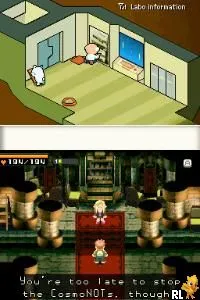
Contact (USA) is a role-playing game that was released for the Nintendo DS. Developed by Grasshopper Manufacture and published by Atlus, it debuted in 2006. The game is notable for its unique blend of RPG elements and interactive storytelling, which sets it apart from traditional titles of its time.
In Contact, players assume the role of a boy who is transported to an alien world where he must interact with various characters and complete quests. The gameplay revolves around exploring environments, engaging in turn-based combat, and solving puzzles. Players can customize their character's abilities and make choices that influence the game's outcome, which encourages replayability and exploration.
This title is worth trying today for those interested in niche RPGs that offer a different experience from mainstream titles. Its quirky art style and unconventional narrative approach can appeal to fans of indie games and those looking for a unique story-driven experience. Although it may not have achieved widespread fame, Contact holds a special place in the hearts of retro gaming enthusiasts and offers a refreshing take on the RPG genre.
GAME INFO
- Platform
- Nintendo DS
- Genre
- RPG
- Publisher
- Marvelous Entertainment
- Developer
- Grasshopper Manufacture
- Released
- 2006
- Players
- 1
- Region
- USA
How to play Contact online
Getting started with Contact involves navigating the game's vibrant world and engaging with its characters. Players begin by exploring their surroundings, gathering information, and completing initial quests. The core loop consists of battling enemies, leveling up, and interacting with various NPCs to uncover more about the story and the boy’s mission.
As you progress, it's essential to pay attention to the dialogues and choices presented, as they can shape your experience. Experimenting with different abilities and strategies in combat will also enhance your gameplay, making it vital to adapt to various challenges throughout the game.
CONTROLS
Controls
- Arrow Keys — D-Pad / Movement
- X — A button
- S — B button
- Z — Y button
- A — X button
- Q — L shoulder
- E — R shoulder
- Enter — Start
- V — Select
Contact FAQ
What type of game is Contact?
This is a role-playing game that combines traditional RPG elements with interactive storytelling and exploration.
Is Contact exclusive to Nintendo DS or did it appear on other systems?
Contact was released exclusively for the Nintendo DS and did not appear on other systems.
Who developed Contact?
The game was developed by Grasshopper Manufacture, a studio known for its unique and innovative titles in the gaming industry.
You may also like
All Nintendo DS games











GAME INFO
- Platform
- Nintendo DS
- Genre
- RPG
- Publisher
- Marvelous Entertainment
- Developer
- Grasshopper Manufacture
- Released
- 2006
- Players
- 1
- Region
- USA
COMMENTS (0)
No comments yet. Be the first to share your thoughts.