The game loads when you press Play · press “Play Now” inside the game if it asks.
'Chou' Kowai Hanashi DS - Ao no Shou (Japan)
'Chou' Kowai Hanashi DS - Ao no Shou
'Chou' Kowai Hanashi DS - Ao no Shou - Horror Classic
- Nintendo DS
- Horror
- 5· 0 votes
GAME INFO
- Platform
- Nintendo DS
- Genre
- Horror
- Players
- 1
- Region
- Japan
How to play 'Chou' Kowai Hanashi DS - Ao no Shou online
Getting Started
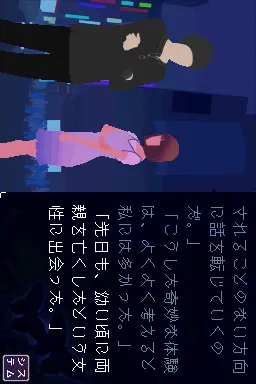
When you first boot up 'Chou' Kowai Hanashi DS - Ao no Shou, you will likely see a title screen in Japanese with options like "はじめる" (Start) and "つづき" (Continue). Use the Arrow Keys to navigate and the X key (A button) to confirm. The game presents a menu of horror story chapters; select one to begin reading.
The core loop is simple: advance through text by pressing X or tapping the screen with your mouse (if using the emulator's touch mode). Some parts will prompt you to make a choice between two or three options - these decisions slightly alter the narrative or lead to different endings. Pay attention to on-screen cues, as some interactions require you to hold the stylus (or mouse) over the screen and wait for an effect.
All menus and story text are in Japanese, so if you do not read the language, you may need an online translation guide or walkthrough. Look for common kanji like "はい" (yes) and "いいえ" (no) to help navigate choices. Save your progress often using the in-game save option (usually accessible from the menu). The game does not autosave, so manually save before closing the emulator.
CONTROLS
Controls
- Arrow Keys: D-Pad / Movement
- X: A button
- S: B button
- Z: Y button
- A: X button
- Q: L shoulder
- E: R shoulder
- Enter: Start
- V: Select
'Chou' Kowai Hanashi DS - Ao no Shou FAQ
Is 'Chou' Kowai Hanashi DS - Ao no Shou an official release, a fan hack, a prototype, or another kind of build?
The game is an official release, specifically developed for the Nintendo DS platform in Japan.
What type of game is 'Chou' Kowai Hanashi DS - Ao no Shou?
It is categorized as a horror game, focusing on creating an unsettling atmosphere and engaging players with its creepy narrative.
Is there anything iconic or memorable about 'Chou' Kowai Hanashi DS - Ao no Shou?
While it may not be widely recognized in the mainstream gaming community, its unique take on horror for the DS platform makes it a noteworthy title for enthusiasts of the genre.
You may also like
All Nintendo DS games









GAME INFO
- Platform
- Nintendo DS
- Genre
- Horror
- Players
- 1
- Region
- Japan
COMMENTS (0)
No comments yet. Be the first to share your thoughts.