CHOOSE A VERSION
3 versions · same consoleChoose an original release, regional version, revision, bootleg or clearly labelled ROM hack/mod, then press Play. Hacks may change the gameplay. Switching versions restarts the player.
Selected: Default · USA · En,Fr,Es · USA
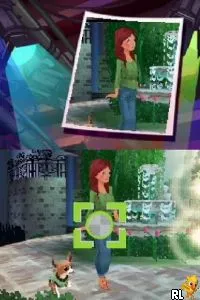
The game loads when you press Play · press “Play Now” inside the game if it asks.
Charm Girls Club - My Fashion Show (USA) (En,Fr,Es)
Charm Girls Club - My Fashion Show
About Charm Girls Club - My Fashion Show
- Nintendo DS
- Simulation
- 5· 0 votes
GAME INFO
- Platform
- Nintendo DS
- Genre
- Simulation
- Released
- 2008
- Players
- 1
- Region
- USA
How to play Charm Girls Club - My Fashion Show online
To start playing Charm Girls Club - My Fashion Show, select your character and begin customizing outfits. You will navigate through various menus to choose clothing, accessories, and hairstyles. The game encourages creativity, so take your time to experiment with different combinations.
The core loop involves preparing for fashion shows where you showcase your designs. Completing mini-games related to fashion will also earn you points, which can be used to unlock new items and features. Make sure to pay attention to the feedback from the judges during the shows to improve your designs and gain better scores.
CONTROLS
Controls
- Arrow Keys — D-Pad / Movement
- X — A button
- S — B button
- Z — Y button
- A — X button
- Q — L shoulder
- E — R shoulder
- Enter — Start
- V — Select
Charm Girls Club - My Fashion Show FAQ
What type of game is Charm Girls Club - My Fashion Show?
A simulation game centered around fashion design and creativity, appealing mainly to a younger audience.
Is Charm Girls Club - My Fashion Show exclusive to Nintendo DS or did it appear on other systems?
This title is primarily associated with the Nintendo DS, and there is no widely documented evidence of its release on other platforms.
Is Charm Girls Club - My Fashion Show considered easy to pick up or challenging?
The game is generally easy to pick up, with straightforward mechanics and a focus on creativity rather than complex gameplay challenges.
You may also like
All Nintendo DS games











GAME INFO
- Platform
- Nintendo DS
- Genre
- Simulation
- Released
- 2008
- Players
- 1
- Region
- USA
COMMENTS (0)
No comments yet. Be the first to share your thoughts.