CHOOSE A VERSION
2 versions · same consoleChoose an original release, regional version, revision, bootleg or clearly labelled ROM hack/mod, then press Play. Hacks may change the gameplay. Switching versions restarts the player.
Selected: Default · USA · USA
The game loads when you press Play · press “Play Now” inside the game if it asks.
Championship Pony (USA)
Championship Pony
Championship Pony on NDS
- Nintendo DS
- Simulation
- 5· 0 votes
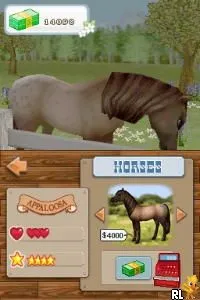
Championship Pony (USA) is a simulation game for the Nintendo DS that revolves around the world of horse riding and care. Released during the DS era, it taps into the popular genre of pet simulation that was gaining traction in the mid-2000s. The game was developed to cater to younger audiences and fans of equestrian sports, offering a light-hearted take on horse management and competition.
In the game, players take on the role of a horse owner and are tasked with caring for their pony. This includes feeding, grooming, and training your horse to prepare for various competitions. The gameplay mechanics focus on the nurturing aspect, allowing players to engage in activities that simulate real-life horse care. As players progress, they can participate in events and races, showcasing their trained ponies' skills.
What makes Championship Pony an interesting title today lies in its nostalgic value and the charming, albeit simple, gameplay mechanics. While it may not have the depth of more recent simulation games, it offers a unique experience for those who enjoy light simulation titles. In the context of its era, it stands as a fun and accessible option for players new to the genre, particularly for younger audiences or those with a fondness for horses.
GAME INFO
- Platform
- Nintendo DS
- Genre
- Simulation
- Released
- 2008
- Players
- 1
- Region
- USA
How to play Championship Pony online
Getting started in Championship Pony involves selecting your pony and customizing its appearance. You will then engage in various activities such as grooming, feeding, and training your pony. The core loop revolves around managing your pony's needs while preparing it for competitions, which adds a layer of strategy to the gameplay.
As you progress, you'll unlock new events and activities, which keeps the gameplay fresh. Pay attention to your pony's health and happiness, as these factors play a crucial role in its performance. Familiarize yourself with the different events and competitions available to maximize your experience in the game.
CONTROLS
Controls
- Arrow Keys — D-Pad / Movement
- X — A button
- S — B button
- Z — Y button
- A — X button
- Q — L shoulder
- E — R shoulder
- Enter — Start
- V — Select
Championship Pony FAQ
Is Championship Pony exclusive to Nintendo DS or did it appear on other systems?
The game is exclusive to the Nintendo DS and did not appear on any other systems.
Does Championship Pony have a multiplayer or co-op mode?
There is no multiplayer or co-op mode available in Championship Pony; the game is strictly a single-player experience.
Who developed Championship Pony?
The developer of Championship Pony is not widely documented, and specific details about the development team are not readily available.
You may also like
All Nintendo DS games











GAME INFO
- Platform
- Nintendo DS
- Genre
- Simulation
- Released
- 2008
- Players
- 1
- Region
- USA
COMMENTS (0)
No comments yet. Be the first to share your thoughts.