CHOOSE A VERSION
2 versions · same consoleChoose an original release, regional version, revision, bootleg or clearly labelled ROM hack/mod, then press Play. Hacks may change the gameplay. Switching versions restarts the player.
Selected: Default · USA · En,Fr,Es · USA
The game loads when you press Play · press “Play Now” inside the game if it asks.
Cartoon Network Racing (USA) (En,Fr,Es)
Cartoon Network Racing
Getting to Know Cartoon Network Racing
- Nintendo DS
- Racing
- 5· 0 votes
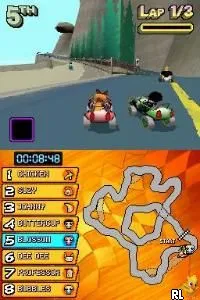
Cartoon Network Racing (USA) (En,Fr,Es) is a racing game released for the Nintendo DS. Developed during the era when cartoon tie-in games were quite popular, it features characters from various Cartoon Network shows. This title is an official release, aiming to capture the fun and excitement of racing with beloved animated characters in a competitive environment.
In this game, players take control of characters from Cartoon Network's lineup, racing on various tracks inspired by the shows. The gameplay focuses on speed and fun, with players navigating through colorful environments while using character-specific abilities to gain an advantage. The mechanics are straightforward, making it accessible for both younger players and those who enjoy casual racing experiences.
What makes Cartoon Network Racing interesting today is its nostalgic value, especially for fans of the network's classic shows. While it may not compete with more sophisticated racing titles, its charm lies in its simplicity and the familiarity of its characters. For fans of Cartoon Network, this game serves as a delightful trip down memory lane, even if it occupies a niche spot in the broader racing game genre.
GAME INFO
- Platform
- Nintendo DS
- Genre
- Racing
- Publisher
- The Game Factory
- Developer
- Firebrand Games
- Released
- 2006
- Players
- 1-2
- Region
- USA
How to play Cartoon Network Racing online
To get started in Cartoon Network Racing, first choose a character from the roster. Each character may have unique abilities, so pick one that fits your play style. Once selected, you can enter a race by navigating through the menus using the controls provided.
The core loop involves racing through various tracks, collecting power-ups, and using character abilities to outpace opponents. Remember to familiarize yourself with the controls and track layouts, as mastering these will enhance your chances of winning. Practice makes perfect, so don't hesitate to retry races to improve your performance.
CONTROLS
Controls
- Arrow Keys — D-Pad / Movement
- X — A button
- S — B button
- Z — Y button
- A — X button
- Q — L shoulder
- E — R shoulder
- Enter — Start
- V — Select
Cartoon Network Racing FAQ
Is Cartoon Network Racing an official release, a fan hack, a prototype, or another kind of build?
This title is an official release for the Nintendo DS, featuring characters from Cartoon Network shows.
Is Cartoon Network Racing exclusive to Nintendo DS or did it appear on other systems?
The game was specifically released for the Nintendo DS, and there is no evidence of it being available on other systems.
What type of game is Cartoon Network Racing?
Cartoon Network Racing is a racing game that allows players to race as characters from various Cartoon Network series.
You may also like
All Nintendo DS games











GAME INFO
- Platform
- Nintendo DS
- Genre
- Racing
- Publisher
- The Game Factory
- Developer
- Firebrand Games
- Released
- 2006
- Players
- 1-2
- Region
- USA
COMMENTS (0)
No comments yet. Be the first to share your thoughts.