CHOOSE A VERSION
2 versions · same consoleChoose an original release, regional version, revision, bootleg or clearly labelled ROM hack/mod, then press Play. Hacks may change the gameplay. Switching versions restarts the player.
Selected: Default · Japan · Japan
The game loads when you press Play · press “Play Now” inside the game if it asks.
Arashi no Yoru ni (Japan)
Arashi no Yoru ni
Arashi no Yoru ni: NDS Adventure
- Nintendo DS
- Adventure
- 5· 0 votes
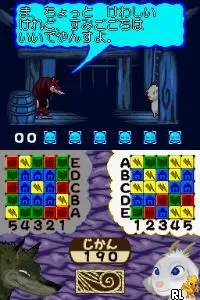
Arashi no Yoru ni, released for the Nintendo DS, is a notable title from Japan that blends adventure and puzzle elements. This game is part of a larger multimedia franchise, which includes a popular children's book and an animated film. It’s tailored for the handheld gaming experience, allowing players to engage with its charming story and characters on the go.
In gameplay, players navigate through various scenarios that revolve around the friendship between a goat and a wolf. The mechanics likely involve solving puzzles and making choices that affect the story's progression. While the exact gameplay details are less documented, the genre conventions suggest a focus on exploration and light problem-solving, typical of many adventure games from this era.
What makes Arashi no Yoru ni worth exploring today is its unique narrative and artistic style, which set it apart from other DS titles. It may not have the widespread recognition of major franchises, but it offers a quaint charm that appeals to fans of narrative-driven games. For those interested in the evolution of storytelling in video games, this title represents a niche yet significant piece of gaming history.
GAME INFO
- Platform
- Nintendo DS
- Genre
- Adventure
- Released
- 2005
- Region
- Japan
How to play Arashi no Yoru ni online
To get started in Arashi no Yoru ni, begin by familiarizing yourself with the game’s menus, which are entirely in Japanese. This may require some navigation through trial and error, so don't hesitate to experiment. The initial gameplay loop typically involves exploring environments, interacting with characters, and solving puzzles to advance the story.
As you progress, focus on the interactions between characters, as they often provide hints or clues necessary for solving puzzles. Keep an eye on your choices, as they can influence the direction of the story. It's important to engage with the narrative and understand the relationships, as this is central to the gameplay experience.
CONTROLS
Controls
- Arrow Keys — D-Pad / Movement
- X — A button
- S — B button
- Z — Y button
- A — X button
- Q — L shoulder
- E — R shoulder
- Enter — Start
- V — Select
Arashi no Yoru ni FAQ
Who developed Arashi no Yoru ni?
The development details for Arashi no Yoru ni are not widely documented, leaving specific information about the developer unclear.
What makes Arashi no Yoru ni stand out among Nintendo DS titles of its era?
Its unique narrative that focuses on the friendship between a goat and a wolf, along with its charming art style, distinguishes it from other titles on the platform.
Is Arashi no Yoru ni exclusive to Nintendo DS or did it appear on other systems?
This title appears to be exclusive to the Nintendo DS, with no confirmed releases on other systems.
You may also like
All Nintendo DS games











GAME INFO
- Platform
- Nintendo DS
- Genre
- Adventure
- Released
- 2005
- Region
- Japan
COMMENTS (0)
No comments yet. Be the first to share your thoughts.