CHOOSE A VERSION
4 versions · same consoleChoose an original release, regional version, revision, bootleg or clearly labelled ROM hack/mod, then press Play. Hacks may change the gameplay. Switching versions restarts the player.
Selected: Default · USA · USA
The game loads when you press Play · press “Play Now” inside the game if it asks.
1 vs 100 (USA)
1 vs 100
What is 1 vs 100?
- Nintendo DS
- Educational
- 5· 0 votes
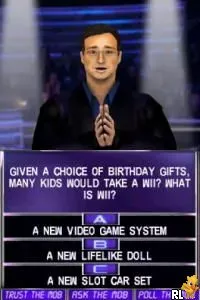
1 vs 100 (USA) is a trivia-based game released on the Nintendo DS, inspired by the popular television game show. Developed by an unknown team and published by an undisclosed entity, this title falls under the educational genre, focusing on testing players' knowledge across various topics. Although not widely recognized, it offers a unique experience for fans of quiz games on a handheld platform.
In this game, players engage in a quiz format where they answer questions to compete against a group of 100 opponents. The core mechanics revolve around answering multiple-choice questions correctly and quickly to outscore the competition. As players progress, they can earn points based on their performance, and the game may include lifelines or similar mechanics to provide assistance during tougher questions.
1 vs 100 offers a nostalgic throwback to the quiz shows of its time and caters to fans of educational titles. While it may not boast the same level of polish or recognition as other Nintendo DS games, it provides an engaging way to test your trivia knowledge. If you enjoy games that challenge your intellect, this title is worth exploring, especially for those who appreciate the quiz genre and the nostalgic charm of the Nintendo DS library.
GAME INFO
- Platform
- Nintendo DS
- Genre
- Educational
- Players
- 1
- Region
- USA
How to play 1 vs 100 online
Getting Started: To begin playing 1 vs 100, start by selecting your game mode and difficulty. The game typically presents a series of trivia questions, and your objective is to answer them correctly before your opponents do. Pay attention to the timer, as your speed can impact your score.
As you progress through the game, you'll encounter various categories and levels of difficulty, which can affect the types of questions asked. Familiarize yourself with the format and try to anticipate the answers based on your knowledge. Utilizing any available lifelines wisely can give you an edge against the 100 opponents, making it crucial to think strategically about when to use them.
CONTROLS
Controls
- Arrow Keys — D-Pad / Movement
- X — A button
- S — B button
- Z — Y button
- A — X button
- Q — L shoulder
- E — R shoulder
- Enter — Start
- V — Select
1 vs 100 FAQ
Which regions was 1 vs 100 released in?
This title was released in the USA, primarily targeting the North American audience.
What makes 1 vs 100 stand out among Nintendo DS titles of its era?
The game stands out due to its trivia format, which combines elements of competitive gameplay with knowledge-based challenges, offering a unique experience for DS players.
Is 1 vs 100 exclusive to Nintendo DS or did it appear on other systems?
1 vs 100 is exclusive to the Nintendo DS and did not appear on other systems, focusing solely on the handheld gaming experience.
You may also like
All Nintendo DS games











GAME INFO
- Platform
- Nintendo DS
- Genre
- Educational
- Players
- 1
- Region
- USA
COMMENTS (0)
No comments yet. Be the first to share your thoughts.