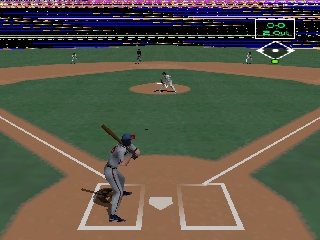
The game loads when you press Play · press “Play Now” inside the game if it asks.
Triple Play 2000 (USA)
Triple Play 2000
Inside Triple Play 2000
- Nintendo 64
- Sports
- 5· 0 votes
Triple Play 2000 is a sports video game released for the Nintendo 64 in the United States. Developed by EA Sports, this game is part of the long-running Triple Play baseball series. It serves as a representation of the baseball genre during a time when sports games were evolving rapidly on home console platforms, providing a blend of arcade-style gameplay with simulation elements.
In Triple Play 2000, players can take control of their favorite baseball teams and compete in various modes, including exhibition games and season play. The game incorporates standard mechanics typical of the era, allowing players to pitch, bat, and field, all while navigating through the 3D environments of baseball stadiums. The controls are designed to be accessible, aiming to attract both casual players and more dedicated baseball fans.
While it may not be the most groundbreaking title in the sports genre, Triple Play 2000 has its charm and nostalgia factor for fans of retro baseball games. It captures the essence of baseball with its straightforward gameplay and familiar team dynamics. Compared to other titles of its time, it offers a solid experience, especially for players seeking a classic sports title that reflects the late 90s gaming landscape.
GAME INFO
- Platform
- Nintendo 64
- Genre
- Sports
- Publisher
- EA Sports
- Developer
- Treyarch
- Released
- 1999
- Players
- 1-2
- Region
- USA
More Triple Play Games
Ready for another round? Explore more Triple Play games and console editions. Choose a game below to play it on its own page.
How to play Triple Play 2000 online
To get started with Triple Play 2000, launch the game and select a mode from the main menu. You can choose to play an exhibition match or dive into a full season with your favorite team. Familiarize yourself with the controls to manage pitching, batting, and fielding effectively.
The core loop involves taking turns at bat and in the field, with the goal of scoring more runs than your opponent. Pay attention to the pitch types and timing when batting, as well as defensive positioning when fielding. These mechanics are central to mastering the game, so practice will help you improve your skills over time.
CONTROLS
Controls
- Arrow Keys — D-Pad / Movement
- X — A button
- S — B button
- Z — Z trigger
- A — C-Down
- Q — L shoulder
- E — R shoulder
- Enter — Start
Triple Play 2000 FAQ
Is Triple Play 2000 an official release, a fan hack, a prototype, or another kind of build?
This game is an official release from EA Sports, part of the established Triple Play series that focused on baseball.
What makes Triple Play 2000 stand out among Nintendo 64 titles of its era?
While it may not have the same level of acclaim as some other sports titles, it offers a straightforward and enjoyable baseball experience that can be appealing for fans of the genre.
Can players save progress in Triple Play 2000?
The game does not have a traditional save feature for season progress but allows players to continue their games in exhibition mode.
You may also like
All Nintendo 64 games











GAME INFO
- Platform
- Nintendo 64
- Genre
- Sports
- Publisher
- EA Sports
- Developer
- Treyarch
- Released
- 1999
- Players
- 1-2
- Region
- USA
COMMENTS (0)
No comments yet. Be the first to share your thoughts.