The game loads when you press Play · press “Play Now” inside the game if it asks.
Volguard
Volguard
Volguard - Shooter Classic
GAME INFO
More Volguard Games
Ready for another round? Explore more Volguard games and console editions. Choose a game below to play it on its own page.
How to play Volguard online
Getting Started
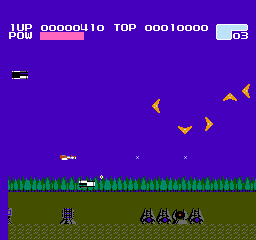
When you launch Volguard, the title screen appears. Press Enter to start; on the Japanese version the menu text is in Japanese, but the start option is typically the first one. Immediately you control your ship. Use the Arrow Keys to move, and S to fire your main weapon. The goal is to survive through each stage by destroying enemies and avoiding their projectiles.
Collect floating items: some upgrade your gun, others grant a temporary shield or spread shot. Pay attention to enemy patterns, especially bosses, which require memorized timing. The game gets harder quickly, so focus on dodging first and shooting second.
Since this is an MSX 1 title, there is no save system - you play from beginning to end in one session. If you die, you restart at a checkpoint. The lack of continues means practice is essential. Use the emulator's save state feature if you need a break.
CONTROLS
Controls
- Arrow Keys: D-Pad / Movement
- X: Trigger 1
- S: Trigger 2
- Enter: Start
Volguard FAQ
Can players save progress in Volguard?
Volguard does not include a battery backup or password system. Progress is lost when the console is turned off or the emulator is closed. Players must complete the game in a single session without saves.
Which regions was Volguard released in?
Volguard was released exclusively in Japan. There is no known official release for North America or Europe. The game text and menus are entirely in Japanese.
Is Volguard exclusive to MSX 1 or did it appear on other systems?
Volguard is exclusive to the MSX 1 platform. It did not receive ports to other home computers or consoles. No sequel or remake exists either.












COMMENTS (0)
No comments yet. Be the first to share your thoughts.