The game loads when you press Play · press “Play Now” inside the game if it asks.
Parodius
Parodius
What is Parodius?
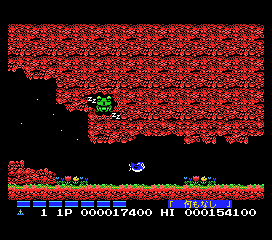
Parodius (also known as Parodius Da! Shinwa kara Owarai e) is a shoot 'em up arcade game released by Konami in 1990. This MSX 1 version is a home port of that arcade hit, bringing the zany, Gradius-like gameplay to the MSX platform. It's the second entry in the Parodius series, which parodies Konami's own Gradius franchise with over-the-top humor and absurd visuals.
The gameplay follows the Gradius formula: you pilot a ship through horizontally scrolling stages, collecting power-up capsules to enhance your weapons and shields. But here, the presentation is deliberately ridiculous - enemies and bosses range from penguins to octopi, and the soundtrack is a chaotic medley of classical tunes and nonsense. The MSX version likely retains the core loop of shooting and dodging, though with the hardware limitations of the time.
What makes Parodius worth playing today is its irreverent charm and the sheer creativity of its absurdity. It stands apart from the typical serious shooters of its era by embracing silliness wholeheartedly. If you enjoy Gradius but wish it had more personality and a sense of humor, this MSX port delivers exactly that.
GAME INFO
How to play Parodius online
When you start the MSX 1 version, you may see a title screen and possibly a menu in Japanese. Select a single-player or two-player mode if available (Start confirms). The core loop is classic Gradius-style: fly from left to right, shoot everything, and pick up the power-up capsules that float in the air. Each capsule increases a meter at the bottom; when you fill a segment, you can use that to activate a specific upgrade (speed, missiles, shields, etc.). Because the MSX 1 has less processing power, expect a slower pace and simpler graphics compared to the arcade original, but the absurd enemy designs still shine. Watch for boss patterns - many attack with predictable waves that you can dodge with careful positioning. If you die, you lose all upgrades, so try to avoid taking hits by using the shield option when available.
CONTROLS
Controls
- Arrow Keys: D-Pad / Movement
- X: Trigger 1
- S: Trigger 2
- Enter: Start
Parodius FAQ
Who developed Parodius?
Konami developed Parodius, releasing it in arcades in 1990 before porting it to various home systems including the MSX 1.
What type of game is Parodius?
It is a horizontal scrolling shoot 'em up that closely follows the gameplay of Gradius but with intentionally silly graphics and music.
Is there anything iconic or memorable about Parodius?
The game is famous for its parody of Gradius, replacing serious spacecraft with cartoonish characters like a flying octopus or a penguin in a spaceship. Its ridiculous bosses and humorous power-up names are a highlight.












COMMENTS (0)
No comments yet. Be the first to share your thoughts.