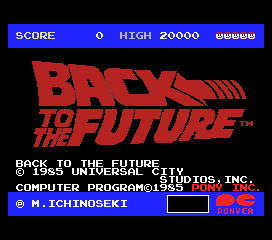
The game loads when you press Play · press “Play Now” inside the game if it asks.
Back To The Future
Back To The Future
Back To The Future Overview
You take control of Marty McFly as he navigates through Hill Valley, jumping over obstacles and avoiding hazards across various stages. The core loop revolves around reaching the end of each level while collecting items and dodging enemies. There's a timed element that reflects the movie's urgency, though the exact mechanics vary by level. Action is straightforward: move left or right, jump over gaps and foes, and occasionally interact with objects. The challenge comes from learning enemy patterns and making precise jumps, typical of the genre's expectations on the MSX 1.
Today, Back to the Future is worth a look for collectors of licensed retro games and fans of the movie who want to see how the franchise was handled on MSX. It doesn't reinvent the wheel - it's a simple action game that fits comfortably alongside other movie tie-ins from the same period. The graphics and sound are competent but unremarkable, and the controls are responsive enough for the era. If you go in expecting a modest, functional adaptation rather than a standout masterpiece, you'll get a pleasant dose of mid-80s nostalgia.
GAME INFO
- Platform
- MSX 1
- Genre
- Action
- Publisher
- Pony Canyon
- Released
- 1985
- Players
- 1
- Region
- Japan
How to play Back To The Future online
Getting Started:
When the game loads, you'll see a title screen and then be dropped into the first stage. There are no language barriers if you're playing the Japanese original - most on-screen information is minimal and relies on simple icons. Your first goal is to move Marty to the right, jumping over trash cans and other obstacles you'll encounter along the way. Enemies like dogs or bullies appear at regular intervals; time your jumps to avoid them, as contact costs you a life.
The core loop is straightforward: each stage presents a linear path from left to right, with a few platforms at varying heights. You collect items such as clocks to increase your score or maybe extend time, though the exact rules aren't explained in-game. Watch for gaps in the ground that require precise jumps - falling into them also costs a life. There's no continue system on the MSX 1 version, so you'll need to restart from the beginning if you lose all lives.
A few practical tips: use the S button to attack if the game allows (some versions have a weapon or a punch), but if not, focus on jumping as your primary means of avoiding danger. The controls are responsive but can feel stiff by modern standards, so get used to the jump arc before attempting tricky sections. If you see a clock icon, try to collect it - it may extend your timer, which is critical for completing the level.
CONTROLS
Controls
- Arrow Keys: D-Pad / Movement
- X: Trigger 1
- S: Trigger 2
- Enter: Start
Back To The Future FAQ
Is Back To The Future exclusive to MSX 1 or did it appear on other systems?
Back to the Future was released on multiple home computers in the mid-80s, including the Commodore 64, ZX Spectrum, and Amstrad CPC, in addition to the MSX 1. The MSX version is a separate port developed specifically for the Japanese market, with different graphics and layout compared to the European computer versions.
Is Back To The Future an official release, a fan hack, a prototype, or another kind of build?
This is an official commercial release. Pony Canyon published it in 1985 under license from Universal Studios. No fan modifications or prototype status has been documented for this particular ROM.
Who developed Back To The Future?
The developer is not widely documented in English sources. Pony Canyon acted as publisher, but the actual programming and design credits remain unclear for the MSX version. Some sources attribute it to a small team within Pony Canyon, but no specific names are confirmed.
You may also like
All MSX 1 games











GAME INFO
- Platform
- MSX 1
- Genre
- Action
- Publisher
- Pony Canyon
- Released
- 1985
- Players
- 1
- Region
- Japan
COMMENTS (0)
No comments yet. Be the first to share your thoughts.