The game loads when you press Play · press “Play Now” inside the game if it asks.
Famista 2 (Japan)
Famista 2
Famista 2: GB Sports
Famista 2 is a sports simulation game released for the Game Boy in Japan. Developed by Namco, this title is part of the Famista series, which revolves around baseball. The game launched in the early 1990s, during a time when portable gaming was beginning to gain traction, offering players a chance to enjoy sports gameplay on the go.
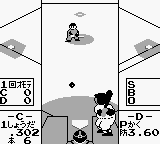
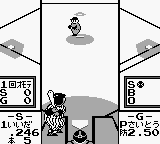
In Famista 2, players engage in baseball matches, controlling teams and players as they navigate through various game modes. The gameplay typically involves batting, pitching, and fielding, which are standard mechanics in baseball games of this era. Players can choose different teams, and the game likely features a season mode, allowing for longer gameplay sessions and strategic team management.
This title is worth exploring for fans of retro sports games, particularly those who appreciate the unique charm of the Game Boy. While it may not have the same level of recognition as some other titles from the era, it provides a nostalgic experience for baseball enthusiasts. The simplicity of the mechanics and the pixel art style evoke fond memories of early handheld gaming, making it a quaint addition to any retro gaming collection.
GAME INFO
More Famista Games
Ready for another round? Explore more Famista games and console editions. Choose a game below to play it on its own page.
How to play Famista 2 online
Getting started with Famista 2 involves selecting your team and game mode from the main menu, which is presented in Japanese. While navigating the menus may be a bit challenging for non-Japanese speakers, you can typically identify options based on their position and layout. The core loop centers around playing matches, where you will alternate between batting and pitching.
During gameplay, focus on mastering the pitching mechanics and timing your swings for optimal hits. The game includes various strategies for both offense and defense, allowing you to experiment with different approaches. As you play, developing your skills and understanding the game mechanics will enhance your experience, especially in competitive matches.
CONTROLS
Controls
- Arrow Keys — D-Pad / Movement
- X — A button (jump / confirm)
- S — B button (run / attack / cancel)
- Enter — Start / Pause
- V — Select
Famista 2 FAQ
Who developed Famista 2?
The game was developed by Namco, a well-known company in the gaming industry, particularly recognized for its contributions to the arcade and console markets.
Is Famista 2 an official release, a fan hack, a prototype, or another kind of build?
Famista 2 is an official release for the Game Boy, part of the Famista series of baseball simulation games developed by Namco.
Is Famista 2 exclusive to Game Boy or did it appear on other systems?
This title is primarily known as a Game Boy release, and there is no widely documented evidence of it being available on other systems.












COMMENTS (0)
No comments yet. Be the first to share your thoughts.