Pop'n Music GB (Japan)
Pop'n Music GB (Japan) - Music Classic
Pop'n Music GB is a rhythm game for the Game Boy Color, part of Konami's long-running Bemani series. Released exclusively in Japan around the year 2000, it adapts the colorful, cartoonish pop-and-oddball song selection of the arcade Pop'n Music games into a portable format. This is an official release, not a hack or fan project, and it stands as one of the few serious rhythm game attempts on Nintendo's handheld before the GBA era.
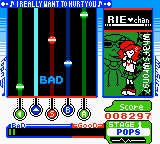
The player taps two buttons in time with falling note markers that scroll down the screen from left and right sides, matching the rhythm to songs from anime, J-pop, and original Konami compositions. Each song has a difficulty rating, and the goal is to hit notes accurately to fill a gauge and clear the track. The game uses the GBC's limited interface well, showing a simplified version of the arcade's character-driven interface with small animated mascots reacting to your performance. Menus are entirely in Japanese, so navigating song selection and settings may require some trial and error for non-readers.
For rhythm game fans, Pop'n Music GB offers a taste of the arcade series on a portable device with a surprisingly solid engine for its time. The soundtrack is catchy, and the challenge scales from forgiving to punishing. It is a niche title even within the GBC library, but it captures the essence of Pop'n Music's quirky charm. Worth playing today as a historical curiosity and a fun pick-up-and-play rhythm game that works well with emulators or original hardware.
How to Play Pop'n Music GB (Japan) Online
Section 2 - Getting Started: Upon booting the game, you'll see a title screen with Pop'n Music characters. Press Start to proceed to the main menu, which lists options like Song Select, Options, and Score Data. Since all menus are in Japanese, you may need to rely on the layout: Song Select is usually the first or second option. Navigate with the D-Pad and confirm with X.
Choose a song from the list; each entry shows a difficulty rating (numbers or stars). After selecting a song, you'll be taken to a brief difficulty selection screen where you can choose between Easy, Normal, or Hard if available. The game then starts: two columns of notes scroll downward. You must press the A button (X key) for notes on the left column and the B button (S key) for notes on the right column. Timing matters: hitting notes precisely fills a life gauge on the left side of the screen. Missing notes drains it. If the gauge empties completely, the song ends prematurely.
The core loop is simple: pick a song, play through it, try to hit as many notes as possible, and unlock new songs by achieving high scores or clearing songs. There is no story mode, just a straight rhythm game experience. If you are new, start with the easiest songs to get used to the timing window. Because the game is Japanese-only, the interface may be confusing, but the gameplay itself is universally understandable once you start a song.
Pop'n Music GB (Japan) Keyboard Controls
Controls
- Arrow Keys: D-Pad / Movement
- X: A button (jump / confirm)
- S: B button (run / attack / cancel)
- Enter: Start / Pause
- V: Select
Comments (0)











