The game loads when you press Play · press “Play Now” inside the game if it asks.
Time Twist - Rekishi no Katasumi de... - Kouhen (Japan)
Time Twist - Rekishi no Katasumi de... - Kouhen
About Time Twist - Rekishi no Katasumi de... - Kouhen
- Famicom Disk System
- Adventure
- 5· 0 votes
GAME INFO
- Platform
- Famicom Disk System
- Genre
- Adventure
- Released
- 1991
- Players
- 1
- Region
- Japan
How to play Time Twist - Rekishi no Katasumi de... - Kouhen online
CONTROLS
Controls
- Arrow Keys: D-Pad / Movement
- X: A button (jump / confirm)
- S: B button (run / attack / cancel)
- Enter: Start / Pause
- V: Select
Time Twist - Rekishi no Katasumi de... - Kouhen FAQ
What makes Time Twist - Rekishi no Katasumi de... - Kouhen stand out among Famicom Disk System titles of its era?
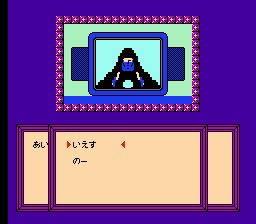
It is one of the few FDS games built around a point-and-click adventure interface rather than platforming or action. The time travel narrative weaves through various historical periods, and the two-disk structure was rare for a story-driven game on the platform. Its reliance on text and puzzles sets it apart from the typical Famicom library.
Is Time Twist - Rekishi no Katasumi de... - Kouhen exclusive to Famicom Disk System or did it appear on other systems?
It was released only for the Famicom Disk System in Japan in 1991. No ports or re-releases have been documented on other consoles or computers. The disk format itself makes it region-locked to Japanese FDS units without modification.
Is there anything iconic or memorable about Time Twist - Rekishi no Katasumi de... - Kouhen?
The title screen music and the opening sequence of a clock tower are often mentioned by fans of obscure FDS games. The need to swap disks mid-game also creates a memorable physical interaction uncommon for the era. Its historical vignettes and branching paths give it a strong identity among adventure game enthusiasts.
You may also like
All Famicom Disk System games Aki to Tsukasa no Fushigi no Kabe
 Yume Koujou - Doki Doki Panic
 Bishoujo Hanafuda Club Vol.2 - Koikoi Bakappana Hen
 Bishoujo Shashinkan - Studio Cut
 Bishoujo Sexy Slot
 Bishoujo Hanafuda Club Vol.1 - Oichokabu Hen
 Transformers - The Headmasters
 Bakutoushi Patton-kun
 Aliens - Alien 2
 Tenshitachi no Houkago
 Backgammon
 Chitei Tairiku Ordola
GAME INFO
- Platform
- Famicom Disk System
- Genre
- Adventure
- Released
- 1991
- Players
- 1
- Region
- Japan
COMMENTS (0)
No comments yet. Be the first to share your thoughts.