The game loads when you press Play · press “Play Now” inside the game if it asks.
Tarot Uranai (Japan)
Tarot Uranai
Tarot Uranai Overview
- Famicom Disk System
- Simulation
- 5· 0 votes
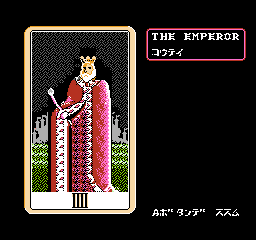
The player steps through a series of menu screens to select a tarot spread - typically a Celtic Cross or similar layout - then draws cards by pressing buttons. Each card displays its name and a symbolic image; the game then shows a short fortune text in Japanese. The core loop involves choosing a spread, receiving a reading, and optionally viewing interpretations for past, present, or future aspects of the querent's question. There is no score, timer, or failure state - just a digital tool for self-reflection.
Tarot Uranai is a niche curiosity even among FDS enthusiasts. Its value lies in its historical context as an early attempt to bring occult practices to a mass-market console, and in the novelty of experiencing a Japanese-language fortune-telling program from the 8-bit era. If you read Japanese and appreciate interactive novelties from the FDS library, it offers a calm, slow-paced session. Expect nothing more than a straightforward digital tarot reading - no hidden depths, but a perfectly honest implementation of its premise.
GAME INFO
- Platform
- Famicom Disk System
- Genre
- Simulation
- Publisher
- Scorpion Software
- Developer
- Scorpion Software
- Released
- 1988
- Players
- 1
- Region
- Japan
How to play Tarot Uranai online
Getting Started
Tarot Uranai is entirely in Japanese, so understanding the menu text is crucial. On boot you'll see a title screen; press Start to enter the main menu. Use the D-Pad to highlight options and press A (X key) to confirm. The first screen likely asks you to choose a spread - common options include one-card, three-card, and Celtic Cross layouts. Select one and press A.
After selecting a spread, the game will prompt you to draw cards. Usually this means pressing A repeatedly to flip each card as it appears. The cards are displayed with their typical Rider-Waite imagery. Once all cards are drawn, the game will display a reading text for each position. You can scroll through the interpretations using the D-Pad. There is no win condition or high score - just click through to get your fortune.
If you want to reset and draw a new reading, you can probably return to the spread selection by pressing B (S key) or using Select (V key). Because the interface is menu-driven, patience and a willingness to experiment with each option will get you through. If you cannot read Japanese, you may still enjoy the card imagery and the novelty of an 8-bit tarot reader.
CONTROLS
Controls
- Arrow Keys: D-Pad / Movement
- X: A button (jump / confirm)
- S: B button (run / attack / cancel)
- Enter: Start / Pause
- V: Select
Tarot Uranai FAQ
Does Tarot Uranai have a multiplayer or co-op mode?
No multiplayer or co-op features are present. Designed as a single-player fortune-telling experience, the game focuses solely on personal readings.
Can players save progress in Tarot Uranai?
The Famicom Disk System allowed saving to the disk medium, so progress such as readings or unlocked spreads could be saved. Actual save functionality depends on the game's implementation.
Who developed Tarot Uranai?
The developer of Tarot Uranai is not widely documented in English sources; the original publisher is also unclear.
You may also like
All Famicom Disk System games Aki to Tsukasa no Fushigi no Kabe
 Yume Koujou - Doki Doki Panic
 Bishoujo Hanafuda Club Vol.2 - Koikoi Bakappana Hen
 Bishoujo Shashinkan - Studio Cut
 Bishoujo Sexy Slot
 Bishoujo Hanafuda Club Vol.1 - Oichokabu Hen
 Transformers - The Headmasters
 Bakutoushi Patton-kun
 Aliens - Alien 2
 Tenshitachi no Houkago
 Backgammon
 Chitei Tairiku Ordola
GAME INFO
- Platform
- Famicom Disk System
- Genre
- Simulation
- Publisher
- Scorpion Software
- Developer
- Scorpion Software
- Released
- 1988
- Players
- 1
- Region
- Japan
COMMENTS (0)
No comments yet. Be the first to share your thoughts.