CHOOSE A VERSION
2 versions · same consoleChoose an original release, regional version, revision, bootleg or clearly labelled ROM hack/mod, then press Play. Hacks may change the gameplay. Switching versions restarts the player.
Selected: Default · Japan · Proto · Scorpion Layout · Japan
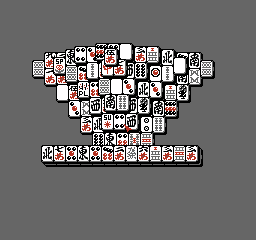
The game loads when you press Play · press “Play Now” inside the game if it asks.
Shanghai II (Japan) (Proto) (Scorpion Layout)
Shanghai II
Shanghai II on FDS
- Famicom Disk System
- Puzzle
- Prototype
- 5· 0 votes
Controls
- Arrow Keys = D-Pad
- X = A button (jump/confirm)
- S = B button (run/attack/cancel)
- Z = Y button
- A = X button
- Q = L shoulder
- E = R shoulder
- Enter = Start
- V = Select
GAME INFO
- Platform
- Famicom Disk System
- Genre
- Puzzle
- Players
- 1
- Region
- Japan
- Version
- Proto
More Shanghai Games
Ready for another round? Explore more Shanghai games and console editions. Choose a game below to play it on its own page.

How to play Shanghai II online
CONTROLS
Controls
- Arrow Keys: D-Pad / Movement
- X: A button (jump / confirm)
- S: B button (run / attack / cancel)
- Enter: Start / Pause
- V: Select
Shanghai II FAQ
Who developed Shanghai II?
The original Shanghai II was developed by Activision, but this specific prototype's development details are not widely documented. It is an unreleased build for the Famicom Disk System.
Does Shanghai II have a multiplayer or co-op mode?
No, Shanghai II is a single-player mahjong solitaire game. This prototype does not include any multiplayer or cooperative options.
What type of game is Shanghai II?
Shanghai II is a puzzle game in the mahjong solitaire genre. The player removes matching pairs of tiles from a layered layout to clear the board.
You may also like
All Famicom Disk System games Aki to Tsukasa no Fushigi no Kabe
 Yume Koujou - Doki Doki Panic
 Bishoujo Hanafuda Club Vol.2 - Koikoi Bakappana Hen
 Bishoujo Shashinkan - Studio Cut
 Bishoujo Sexy Slot
 Bishoujo Hanafuda Club Vol.1 - Oichokabu Hen
 Transformers - The Headmasters
 Bakutoushi Patton-kun
 Aliens - Alien 2
 Tenshitachi no Houkago
 Backgammon
 Chitei Tairiku Ordola
GAME INFO
- Platform
- Famicom Disk System
- Genre
- Puzzle
- Players
- 1
- Region
- Japan
- Version
- Proto
COMMENTS (0)
No comments yet. Be the first to share your thoughts.