The game loads when you press Play · press “Play Now” inside the game if it asks.
Section-Z (Japan)
Section-Z
About Section-Z
- Famicom Disk System
- Run and Gun
- 5· 0 votes
GAME INFO
- Platform
- Famicom Disk System
- Genre
- Run and Gun
- Released
- 1987
- Players
- 1
- Region
- Japan
How to play Section-Z online
Getting Started
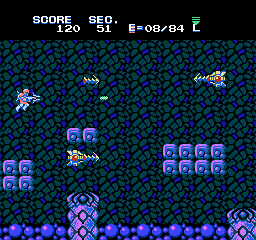
When you boot up Section-Z on the Famicom Disk System, you'll see a Japanese title screen. Press Start to begin. The game is in Japanese, but the menus are minimal - you mainly choose between starting a new game or continuing via a password system (which saves your progress as a code). After selecting new game, you are dropped into a side-scrolling stage where you control a soldier with a jetpack. Your goal is to shoot enemies and reach the end of each level.
The core gameplay loop involves moving right, shooting enemies and avoiding their attacks. You can collect power-up capsules that change your weapon. The default weapon is a short-range spread, but picking up letters like S (for speed? actually it's a specific weapon) or B (bounce shot) alters your attack. Experiment to find what works best. The game is tough and enemies respawn if you backtrack, so keep moving forward. If you die, you restart from a checkpoint or the beginning of the stage depending on continues. Use the password system to resume your progress later. Since the FDS version has a separate Disk Side A/B, you may need to flip the disk during a long session - the emulator likely handles this automatically.
CONTROLS
Controls
- Arrow Keys: D-Pad / Movement
- X: A button (jump / confirm)
- S: B button (run / attack / cancel)
- Enter: Start / Pause
- V: Select
Section-Z FAQ
Which regions was Section-Z released in?
Section-Z first appeared on the Famicom Disk System exclusively in Japan in 1987. A cartridge version for the NES later released in North America in 1989 under the same title.
Roughly how long does it take to finish Section-Z?
A skilled player can complete the game in about 20 to 30 minutes. The difficulty is high, so first-time runs often take longer due to repeated deaths and learning enemy patterns.
Is there anything iconic or memorable about Section-Z?
Its unique weapon power-up system, where collecting lettered capsules changes your shot, stands out as memorable. The music and stage designs also have a distinctive arcade feel that Capcom was known for at the time.
You may also like
All Famicom Disk System games Aki to Tsukasa no Fushigi no Kabe
 Yume Koujou - Doki Doki Panic
 Bishoujo Hanafuda Club Vol.2 - Koikoi Bakappana Hen
 Bishoujo Shashinkan - Studio Cut
 Bishoujo Sexy Slot
 Bishoujo Hanafuda Club Vol.1 - Oichokabu Hen
 Transformers - The Headmasters
 Bakutoushi Patton-kun
 Aliens - Alien 2
 Tenshitachi no Houkago
 Backgammon
 Chitei Tairiku Ordola
GAME INFO
- Platform
- Famicom Disk System
- Genre
- Run and Gun
- Released
- 1987
- Players
- 1
- Region
- Japan
COMMENTS (0)
No comments yet. Be the first to share your thoughts.