The game loads when you press Play · press “Play Now” inside the game if it asks.
Professional Mahjong Gokuu (Japan)
Professional Mahjong Gokuu
Professional Mahjong Gokuu - Board Game Classic
- Famicom Disk System
- Board Game
- 5· 0 votes
GAME INFO
- Platform
- Famicom Disk System
- Genre
- Board Game
- Released
- 1986
- Region
- Japan
How to play Professional Mahjong Gokuu online
Getting Started
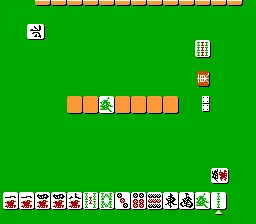
When you boot up Professional Mahjong Gokuu, you're greeted with a title screen and a menu in Japanese. Use the D-Pad to navigate and press X (A button) to select an option. The main menu typically offers a single-player game against AI opponents. Choose your starting hand and begin a standard game of Mahjong, aiming to complete a winning hand by drawing and discarding tiles.
The core loop involves drawing a tile from the wall, then deciding which tile to discard. Pay attention to what other players discard to avoid giving them needed tiles. The game follows traditional Japanese Mahjong rules (riichi mahjong), so you must have a valid hand composition (melds and a pair) to declare a win. The controls let you call tiles for melds (pon, chi, kan) when appropriate, using the B button to cancel or skip.
Since all menus are in Japanese, basic familiarity with Mahjong terminology helps. The game tracks scores automatically. There are no English patches in this original version. Focus on building a hand with at least one yaku pattern to win. Practice reading the tile symbols; the game uses standard mahjong tile shapes with Japanese characters.
CONTROLS
Controls
- Arrow Keys: D-Pad / Movement
- X: A button (jump / confirm)
- S: B button (run / attack / cancel)
- Enter: Start / Pause
- V: Select
Professional Mahjong Gokuu FAQ
Is Professional Mahjong Gokuu considered easy to pick up or challenging?
The game uses standard Japanese Mahjong rules, which have a learning curve for newcomers due to scoring and yaku requirements. AI opponents play at a moderate skill level, so beginners may find it tough until they memorize tile patterns and basic strategies.
Does Professional Mahjong Gokuu have a multiplayer or co-op mode?
No multiplayer or co-op mode exists. The game is strictly a single-player experience where you compete against computer-controlled opponents. No link cable support or split-screen was implemented.
Is there anything iconic or memorable about Professional Mahjong Gokuu?
For many retro collectors, it stands out as a representative example of FDS mahjong titles, but it does not have any famous characters or distinctive visual gimmicks. Its name and plain presentation make it more of a niche curiosity than a beloved classic.
You may also like
All Famicom Disk System games Aki to Tsukasa no Fushigi no Kabe
 Yume Koujou - Doki Doki Panic
 Bishoujo Hanafuda Club Vol.2 - Koikoi Bakappana Hen
 Bishoujo Shashinkan - Studio Cut
 Bishoujo Sexy Slot
 Bishoujo Hanafuda Club Vol.1 - Oichokabu Hen
 Transformers - The Headmasters
 Bakutoushi Patton-kun
 Aliens - Alien 2
 Tenshitachi no Houkago
 Backgammon
 Chitei Tairiku Ordola
GAME INFO
- Platform
- Famicom Disk System
- Genre
- Board Game
- Released
- 1986
- Region
- Japan
COMMENTS (0)
No comments yet. Be the first to share your thoughts.