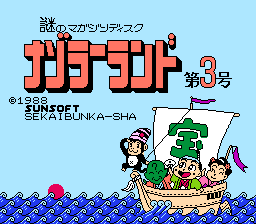
The game loads when you press Play · press “Play Now” inside the game if it asks.
Nazoler Land - Daisangou (Japan)
Nazoler Land - Daisangou
Nazoler Land - Daisangou Overview
- Famicom Disk System
- Puzzle
- 5· 0 votes
The core gameplay involves guiding the protagonist through grid-based environments, likely navigating obstacles and solving simple puzzles to progress. Players probably have to collect keys, avoid or defeat enemies, and reach the exit of each stage. The D-pad controls movement, while the B button (S key) is used for actions like attacking or interacting. Since the game is entirely in Japanese, understanding menus may require trial and error or a translation guide.
For collectors of obscure FDS software, Nazoler Land - Daisangou is a curiosity worth a quick look. It doesn't stand out as a masterpiece, but it represents the kind of quirky, lesser-known titles that filled the disk system's library. If you enjoy early puzzle games with a retro charm, this might scratch that itch. Just don't expect deep mechanics or polished production values.
GAME INFO
- Platform
- Famicom Disk System
- Genre
- Puzzle
- Players
- 1
- Region
- Japan
How to play Nazoler Land - Daisangou online
Getting Started
When you first boot up Nazoler Land - Daisangou, you will see a title screen with Japanese text. Press Start (Enter) to begin. The menus are entirely in Japanese, so you may need to experiment with options; typically, selecting the first one begins the game. The core loop is navigating your character through each stage, collecting items like keys to open doors, and avoiding or defeating enemies. The game likely uses a simple life system where contact with enemies costs a health point.
Pay attention to visual cues - colored blocks, switches, and doors indicate puzzles. Use the D-pad to move, and press X (A button) to confirm selections in menus or perform context-sensitive actions. In-game, the B button (S) is your primary action button for attacking or interacting. If you get stuck, try talking to NPCs or walking into walls to reveal hidden passages. Since there is no in-game English, a fan translation guide may help understand the objective of each stage.
CONTROLS
Controls
- Arrow Keys: D-Pad / Movement
- X: A button (jump / confirm)
- S: B button (run / attack / cancel)
- Enter: Start / Pause
- V: Select
Nazoler Land - Daisangou FAQ
Who developed Nazoler Land - Daisangou?
The developer of Nazoler Land - Daisangou is not widely documented in English-language sources. It was likely an internal team at a smaller Japanese software house that produced games for the Famicom Disk System.
Is there anything iconic or memorable about Nazoler Land - Daisangou?
For most players, Nazoler Land - Daisangou is an obscure title with no standout music or graphics. Its main appeal today is as a rare curiosity for collectors of FDS puzzle-action games, not as a classic.
Is Nazoler Land - Daisangou an official release, a fan hack, a prototype, or another kind of build?
Based on its distribution through typical FDS channels and its inclusion in emulation archives, it appears to be an official commercial release. However, concrete proof is thin, and some consider it a niche software listing with uncertain origins.
You may also like
All Famicom Disk System games Aki to Tsukasa no Fushigi no Kabe
 Yume Koujou - Doki Doki Panic
 Bishoujo Hanafuda Club Vol.2 - Koikoi Bakappana Hen
 Bishoujo Shashinkan - Studio Cut
 Bishoujo Sexy Slot
 Bishoujo Hanafuda Club Vol.1 - Oichokabu Hen
 Transformers - The Headmasters
 Bakutoushi Patton-kun
 Aliens - Alien 2
 Tenshitachi no Houkago
 Backgammon
 Chitei Tairiku Ordola
GAME INFO
- Platform
- Famicom Disk System
- Genre
- Puzzle
- Players
- 1
- Region
- Japan
COMMENTS (0)
No comments yet. Be the first to share your thoughts.