The game loads when you press Play · press “Play Now” inside the game if it asks.
Kattobi! Douji (Japan)
Kattobi! Douji
Getting to Know Kattobi! Douji
- Famicom Disk System
- Racing
- 5· 0 votes
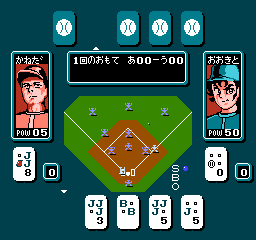
Kattobi! Douji is a racing game released for the Famicom Disk System in 1988 by Toho. It is a Japan-exclusive title that takes advantage of the FDS's increased storage and save features. The game puts players in control of a young boy on a motorcycle, zipping through roads in a top-down perspective.
The gameplay involves steering your bike across scrolling roads, dodging oncoming traffic and obstacles while trying to reach the finish line. Speed management is key, as colliding with hazards slows you down. There are multiple stages with different road layouts and increasing difficulty. The game uses a simple control scheme typical of the era.
For retro racing fans, Kattobi! Douji offers a quirky and challenging experience that stands apart from more famous racing franchises. Its cute protagonist and straightforward gameplay make it a fun pick-up-and-play title. While it may not have the depth of later racing games, it captures the charm of early FDS titles and is worth a try for collectors of Japanese exclusive games.
GAME INFO
- Platform
- Famicom Disk System
- Genre
- Racing
- Released
- 1988
- Players
- 1
- Region
- Japan
How to play Kattobi! Douji online
Getting Started
When you boot up Kattobi! Douji, you'll see a title screen in Japanese. Press Start (Enter) to proceed. The menu uses only Japanese text, so you may need to experiment with the D-pad and A button to select options like mode or stage. Typically, pressing A confirms and B goes back.
The core gameplay is a top-down racer where you control a motorcycle. Use the D-pad to steer left and right, and accelerate with the A button. Your goal is to reach the end of each stage while avoiding cars and road hazards. Collisions slow you down, so precise dodging is crucial. There are no continues documented, so try to finish each run in one go. The game saves progress on the FDS disk after each stage, which is helpful for a longer session.
CONTROLS
Controls
- Arrow Keys: D-Pad / Movement
- X: A button (jump / confirm)
- S: B button (run / attack / cancel)
- Enter: Start / Pause
- V: Select
Kattobi! Douji FAQ
Is Kattobi! Douji exclusive to Famicom Disk System or did it appear on other systems?
It was released only for the Famicom Disk System in Japan. There are no known ports to other platforms.
Does Kattobi! Douji have a multiplayer or co-op mode?
The game is strictly single-player. No two-player or cooperative options exist.
Who developed Kattobi! Douji?
The developer is not widely documented, but the game was published by Toho in 1988.
You may also like
All Famicom Disk System games Aki to Tsukasa no Fushigi no Kabe
 Yume Koujou - Doki Doki Panic
 Bishoujo Hanafuda Club Vol.2 - Koikoi Bakappana Hen
 Bishoujo Shashinkan - Studio Cut
 Bishoujo Sexy Slot
 Bishoujo Hanafuda Club Vol.1 - Oichokabu Hen
 Transformers - The Headmasters
 Bakutoushi Patton-kun
 Aliens - Alien 2
 Tenshitachi no Houkago
 Backgammon
 Chitei Tairiku Ordola
GAME INFO
- Platform
- Famicom Disk System
- Genre
- Racing
- Released
- 1988
- Players
- 1
- Region
- Japan
COMMENTS (0)
No comments yet. Be the first to share your thoughts.