The game loads when you press Play · press “Play Now” inside the game if it asks.
Game no Tatsujin - Money Wars (Japan) (Unl)
Game no Tatsujin - Money Wars
Game no Tatsujin - Money Wars: FDS Strategy
- Famicom Disk System
- Strategy
- Unlicensed
- 5· 0 votes
Game no Tatsujin - Money Wars is an unlicensed Famicom Disk System title that emerged in Japan sometime during the system's commercial lifespan, though the exact release year isn't widely documented. As the name suggests, it's a financial strategy game where players engage in some form of economic competition. Being an unlicensed product, it was produced without Nintendo's approval, likely by a small third-party outfit or a hobbyist coder. The disk's label and packaging, if any, are obscure today, making it a curious artifact for retro collectors rather than a mainstream release.
In the game, you probably take control of a character or entity trying to accumulate wealth through trading, investing, or battling opponents in monetary disputes. The core loop likely involves making financial decisions, such as buying low and selling high, negotiating deals, or engaging in simulated money-based conflicts. Since it's on the Famicom Disk System, loading and saving would have used the disk's magnetic storage. Without a manual, the exact mechanics remain uncertain, but the title suggests a turn-based or real-time economic simulation with a competitive edge.
For today's retro gaming enthusiast, Game no Tatsujin - Money Wars offers a glimpse into the unlicensed scene of the Famicom era, where creativity sometimes outpaced legality. It's a niche title that appeals to collectors of rare FDS disks and fans of unconventional strategy games. Compared to official releases like the financial simulators on PC-88 or NES, this one is far less polished but carries the charm of a bootleg experiment. If you enjoy hunting down obscure software and experiencing weird game concepts, this is worth a virtual floppy disk load - just don't expect a polished experience.
GAME INFO
- Platform
- Famicom Disk System
- Genre
- Strategy
- Region
- Japan
How to play Game no Tatsujin - Money Wars online
Getting Started
When you first boot Game no Tatsujin - Money Wars on an emulator, you'll likely see a title screen in Japanese without English options. Press Start (Enter) to proceed, then navigate menus using the D-Pad and confirm with A (X key). The game probably presents a main menu where you can start a new game, load a saved state (if the emulator supports disk saves), or adjust options - though these are all in kanji and hiragana. If you don't read Japanese, experiment with the default selection and press A to begin.
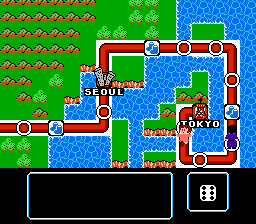
The core gameplay revolves around managing money through buying, selling, or battling. You'll see a screen with your funds, inventory, and opponents. Use the D-Pad to choose actions like "Buy," "Sell," or "Attack" (though the exact terms are speculative). The B button (S key) often cancels or goes back, while A confirms. Pay attention to numbers changing as you make transactions. If you run out of money or lose a battle, the game might end, so try to build up a reserve early.
Because this is a Japanese-only unlicensed game, there's no manual online. Your best bet is to watch longplays or use a fan translation if one exists. If you're stuck, try pressing all buttons on each screen to discover hidden functions. The game's simplicity means you can learn the flow by trial and error, but keep a save state handy to avoid restarting completely.
CONTROLS
Controls
- Arrow Keys: D-Pad / Movement
- X: A button (jump / confirm)
- S: B button (run / attack / cancel)
- Enter: Start / Pause
- V: Select
Game no Tatsujin - Money Wars FAQ
Who developed Game no Tatsujin - Money Wars?
The developer of this unlicensed Famicom Disk System title is not publicly documented. No specific team or individual has been credibly linked to its creation, and it remains an orphaned piece of software from the unlicensed scene.
Which regions was Game no Tatsujin - Money Wars released in?
It appears to have been released only in Japan, likely due to the unlicensed nature and the Famicom Disk System's regional lockout. No evidence suggests a Western release or translation.
Is Game no Tatsujin - Money Wars exclusive to Famicom Disk System or did it appear on other systems?
As far as known, it is exclusive to the Famicom Disk System. No ports or adaptations to other platforms like the NES or PC have been documented.
You may also like
All Famicom Disk System games Aki to Tsukasa no Fushigi no Kabe
 Yume Koujou - Doki Doki Panic
 Bishoujo Hanafuda Club Vol.2 - Koikoi Bakappana Hen
 Bishoujo Shashinkan - Studio Cut
 Bishoujo Sexy Slot
 Bishoujo Hanafuda Club Vol.1 - Oichokabu Hen
 Transformers - The Headmasters
 Bakutoushi Patton-kun
 Aliens - Alien 2
 Tenshitachi no Houkago
 Backgammon
 Chitei Tairiku Ordola
GAME INFO
- Platform
- Famicom Disk System
- Genre
- Strategy
- Region
- Japan
COMMENTS (0)
No comments yet. Be the first to share your thoughts.