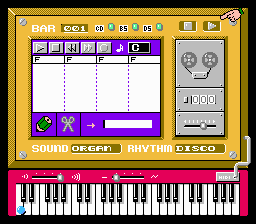
Family Composer (Japan) (Rev 1) (Possible Proto)
What is Family Composer (Japan) (Rev 1) (Possible Proto)?
Family Composer is a curious piece of software for the Famicom Disk System, and this particular dump carries the 'Rev 1' label with a 'Possible Proto' tag, indicating it's an early build rather than a finished retail release. It dates from an uncertain point in the FDS lifecycle, likely aimed at a Japanese audience given the platform's regional exclusivity. No official developer or publisher is reliably documented for this title, which adds to its mystique as a prototype that never saw a wide commercial launch.
The core purpose of Family Composer appears to be music creation, leaning on the FDS's expanded sound capabilities over standard Famicom cartridges. If it follows typical early music software conventions, you would use the controller to select notes, adjust pitch, and arrange sequences on a grid or staff interface. The disk system's ability to save data means compositions could be stored and reloaded, though the prototype nature means menus and feedback are entirely in Japanese and may be incomplete.
Today, Family Composer is a niche curiosity for retro enthusiasts interested in prototype software or early music tools on console hardware. It doesn't offer a polished game experience, but its rarity and the glimpse it provides into what might have been a full product make it worth a quick look for collectors. Compared to later FDS titles like Otocky or Koei's music games, this feels like a rough sketch rather than a finished tool, but that unfinished quality is exactly what draws people to prototype dumps.
How to Play Family Composer (Japan) (Rev 1) (Possible Proto) Online
When you first load Family Composer, you're greeted with a text-heavy menu screen entirely in Japanese. Use the D-Pad to highlight options and press A (X key) to select. The primary purpose seems to be composing simple melodies: you'll hear a basic tone when you move the cursor over a note position, and pressing B (S key) might place or remove a note. The interface likely uses a grid layout with rows for pitch and columns for timing, similar to early tracker software on PCs.
Because this is a prototype, expect rough edges and possibly incomplete functionality. If you're unfamiliar with Japanese, take screenshots of the menu and compare them to known FDS music tools for clues on what each option does. The core loop involves placing notes, playing back your sequence (probably with Select or a menu option), and saving to the disk image if the emulator supports writes. Don't expect a tutorial or clear feedback; experimentation is the only way to unlock what little polish the prototype has.
Family Composer (Japan) (Rev 1) (Possible Proto) Keyboard Controls
Controls
- Arrow Keys: D-Pad / Movement
- X: A button (jump / confirm)
- S: B button (run / attack / cancel)
- Enter: Start / Pause
- V: Select


Comments (0)