The game loads when you press Play · press “Play Now” inside the game if it asks.
Worms (World)
Worms
Worms on Jaguar
- ATARI Jaguar
- Strategy
- 5· 0 votes
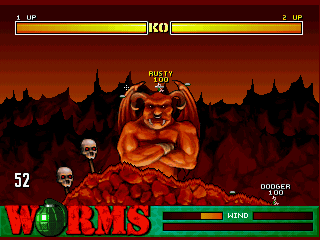
Worms landed on the Atari Jaguar in 1995, bringing Team17's beloved 2D artillery tactical game to the platform. This is the very first Worms game, originally released on PC and later ported to various systems including the Jaguar. It's a turn-based strategy title where you command a squad of worms against AI or human opponents.
Your goal is straightforward: wipe out the opposing worm teams using an arsenal of wacky weapons like bazookas, grenades, and sheep. Each turn you adjust angle and power, factoring in wind and terrain. The landscape is randomly generated from seeds, offering over 55,000 possible level layouts, so no two battles feel the same. Weapons and terrain destruction add a layer of tactical depth.
Even today, the original Worms holds up as a simple yet addictive party game. The Jaguar version is a solid port, letting you enjoy the classic multiplayer chaos locally. If you appreciate turn-based strategy with a sense of humor, it's worth a try. Just don't expect elaborate graphics or a story - this is pure, straightforward fun.
GAME INFO
- Platform
- ATARI Jaguar
- Genre
- Strategy
- Publisher
- Ocean Software
- Developer
- Team17
- Released
- 1995
- Players
- 1-4
- Region
- USA, Europe
How to play Worms online
To start playing, select a game mode from the main menu. You can choose a single-player skirmish against computer opponents or a multiplayer match with friends. Each player controls a team of worms, taking turns to move and attack.
The core loop is simple: aim your weapon by adjusting the angle and power, then fire. Pay attention to wind direction and the destructible terrain. Use the D-pad to move your worm left or right, and press the jump button to hop over obstacles. Weapons are selected from your inventory; you start with limited ammo for each. The last team with surviving worms wins.
New players should start with the default weapon loadout and lower AI difficulty. Experiment with different angles and power levels to get a feel for trajectory. Remember that you can also move your worm to a better position before attacking - sometimes a well-placed grenade bounce is more effective than a direct shot.
CONTROLS
Controls
- Arrow Keys: D-Pad / Movement
- X: A button
- S: B button
- Z: C button
- Enter: Pause
- V: Option
Worms FAQ
Is Worms exclusive to ATARI Jaguar or did it appear on other systems?
Worms was originally released on PC (DOS) in 1995 and later ported to several consoles, including the Atari Jaguar, PlayStation, Sega Saturn, and Game Boy. It is not exclusive to the Jaguar.
Roughly how long does it take to finish Worms?
There is no traditional campaign, so playtime depends on how many rounds you play. A single skirmish against AI opponents typically lasts 15 - 30 minutes. Multiplayer matches can vary widely.
Who developed Worms?
Worms was developed by Team17, a British studio known for the Worms series and other games like Alien Breed and Super Stardust.
You may also like
All ATARI Jaguar games



GAME INFO
- Platform
- ATARI Jaguar
- Genre
- Strategy
- Publisher
- Ocean Software
- Developer
- Team17
- Released
- 1995
- Players
- 1-4
- Region
- USA, Europe
COMMENTS (0)
No comments yet. Be the first to share your thoughts.