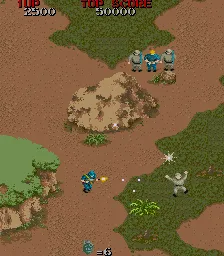
Commando (US, set 2)
What is Commando (US, set 2)?
Commando (US, set 2) is the American revision of Capcom's 1985 run-and-gun arcade game, originally released in Japan as Senjō no Ōkami. Designed by Tokuro Fujiwara, this top-down shooter was a big hit in arcades and later ported to many home systems. In North America it was distributed by Data East, but the core development stayed with Capcom. Despite its name, it has nothing to do with the Arnold Schwarzenegger film that came out six months later. This particular 'set 2' version is a later revision with slight tweaks from the original Japanese release, likely adjusting difficulty or bug fixes for the US market.
How to Play Commando (US, set 2) Online
Getting Started
When the game starts, press Enter to insert a coin, then press Enter again to start. You control a commando soldier moving through vertically scrolling jungle and enemy bases. Use the arrow keys to move in eight directions. Press S (B) to fire your standard weapon; you can also press another button to throw a grenade, but the default mapping assigns attack to S. Watch your ammo - fuel is limited and you'll need to pick up supply crates dropped by enemies.
The core loop is straightforward: move up the screen while shooting enemy soldiers, dodging their bullets, and avoiding obstacles. Collect power-ups like the machine gun or spread shot to increase your firepower. Each stage ends with a boss encounter - usually a heavily armored vehicle or a large group of soldiers. If you die, you start over from the beginning of the current level, but you can continue by inserting more credits. There's no save system; it's pure arcade action meant for high-score chases.
New players should focus on learning enemy patterns and conserving grenades for tough spots. The game's difficulty ramps up quickly, so expect to replay early stages multiple times. The US set 2 version is known for being slightly less punishing than the original Japanese release, making it a good entry point for newcomers.
Commando (US, set 2) Keyboard Controls
Controls
- Arrow Keys: Joystick / Movement
- X: Button 1
- S: Button 2
- Z: Button 3
- A: Button 4
- Q: Button 5
- E: Button 6
- Enter: Start / 1P
- V: Coin / Insert
Comments (0)