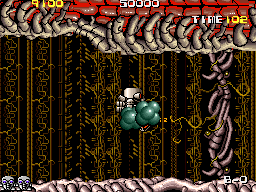
Atomic Robo-kid (Japan, Type-2, set 2)
Atomic Robo-kid (Japan, Type-2, set 2) Overview
Atomic Robo-kid is a horizontally scrolling shooter that hit arcades in 1988, developed and published by UPL. This particular ROM set is the Japan Type-2 revision, meaning it's a specific version of the original board with minor code differences that collectors and emulation enthusiasts sometimes seek out. The game also saw a North American release in February 1989 under Nikom, which was that company's only arcade title. It later received a PC Engine port called Atomic Robo-kid Special, but the arcade original remains the definitive version for fans of classic shooters.
How to Play Atomic Robo-kid (Japan, Type-2, set 2) Online
To start the game, press Enter to insert coins (if needed) and then V to select. The title screen is in Japanese, but the menu options are straightforward: pressing Start begins the game. Atomic Robo-kid is a side-scrolling shooter where you control a robot protagonist. Your goal is to survive each level by shooting enemies and dodging obstacles while collecting power-ups that enhance your weaponry.
The core loop is simple: move left or right with the D-Pad, shoot with S, and jump with X when needed. You start with a basic shot, but destroying certain enemies drops power-ups that increase your firepower or grant temporary shields. The game scrolls automatically, forcing you to keep moving forward. Watch for enemy patterns and try to memorize them to avoid taking damage. If you die, you lose your current power-ups and restart from a checkpoint. The Japan version uses a standard coin insertion system; press Enter to simulate inserting a coin, then Start to begin playing.
Atomic Robo-kid (Japan, Type-2, set 2) Keyboard Controls
Controls
- Arrow Keys: Joystick / Movement
- X: Button 1
- S: Button 2
- Z: Button 3
- A: Button 4
- Q: Button 5
- E: Button 6
- Enter: Start / 1P
- V: Coin / Insert


Comments (0)